
Test your business recovery plan before a disruption
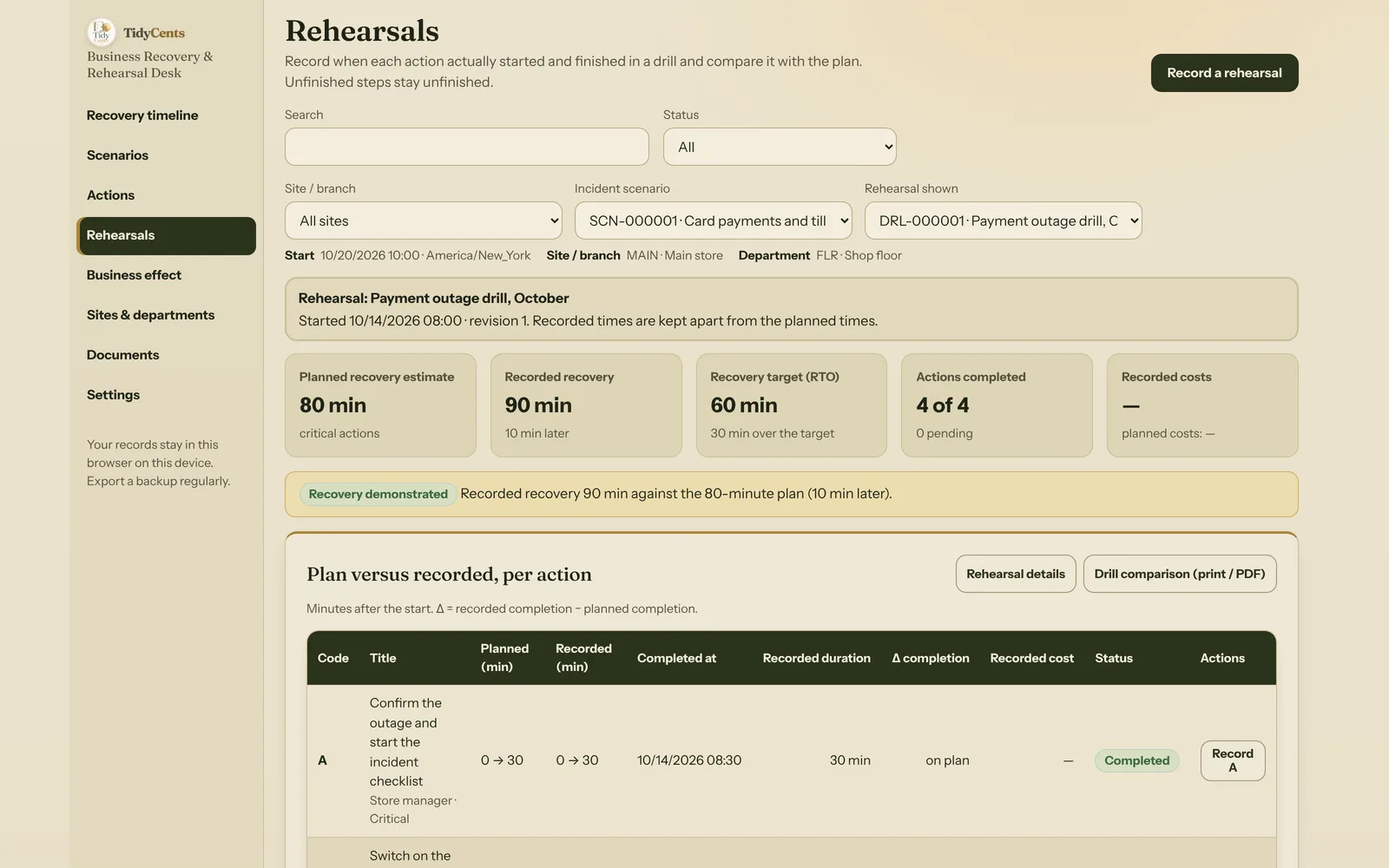
A recovery plan is useful only if people can perform it in the right order with the resources available. A list of emergency contacts and a reassuring document title do not establish how long the business needs to resume critical work. In the worked example below, a plan that looks like 80 minutes on paper needs 90 minutes in a rehearsal, misses its 60-minute target by 30 minutes, and the outage it protects against costs $530 — or $130 plus 40 waiting orders, depending on what customers do.
Start with one defined scenario
"IT goes down" is not a scenario. A payment-service outage, loss of access to a workshop and a failure of an internal system need different actions, different people and different decisions. Write down three things before you estimate any times:
- The trigger — what starts the scenario. Example: card terminals decline every payment, or the tills cannot reach the payment service.
- The scope — what counts as recovered. Example: card payments accepted on every till and sales syncing with the stock system again.
- The targets — the RTO (recovery time objective: how long until the critical work must run again) and, if data has to be restored, the RPO (recovery point objective: the oldest data you can accept losing). The RPO is not the length of the outage.
Without a written scope, every estimate drifts: one person stops the clock when the first till works, another when the last order has synced.
Make dependencies explicit
Recovery steps are rarely a simple list. Some can run in parallel, others can only start when something else is finished. If access must be restored before a system can be checked, the check cannot start at time zero.
Take the fictional home-goods store from the demo, eight staff, one shop:
| Step | Action | Duration | Starts after |
|---|---|---|---|
| A | Confirm the outage and start the incident checklist | 30 min | — |
| B | Switch on the backup card reader on mobile data | 20 min | A |
| C | Restore the till sync with the stock system | 40 min | A |
| D | Test sale on every till and reopen card payments | 10 min | B and C |
Each step's earliest start is the latest earliest finish of its prerequisites; its earliest finish is that start plus its duration:
- A: 0 → 30
- B: 30 → 50
- C: 30 → 70
- D: 70 → 80 (it must wait for C, the longer branch)
The planned recovery is the latest finish among the critical actions: 80 minutes. The chain that sets it is A → C → D. Shortening B would change nothing; shortening C would.
Use the recovery target as a target
The store's RTO is 60 minutes. The plan needs 80, so the gap is 20 minutes. That number is useful because it is specific: it tells you that the problem is on the A → C → D chain, not that "the plan should be faster".
What the gap does not do is prove the business can recover in either time. An 80-minute estimate is a calculation from durations people wrote down. It assumes every step takes exactly its estimate and that there are enough hands for every parallel branch.
Check shared resources
That second assumption fails surprisingly often. In the store, steps B and C both need the IT lead — the same person. The plan above schedules both between minute 30 and minute 50. A good planning tool should not quietly "fix" this by reordering steps; it should warn you that the same resource is booked twice and let you decide.
If the IT lead really has to do both, add a prerequisite so they run one after the other (B after C, or C after B) and the estimate rises accordingly. If a second person can take B, record that person's role instead. Either way, the decision is visible instead of hidden inside an "optimal" schedule.
For a medium-sized business this matters even more. In the second demo, a distributor with three sites and six departments has one central IT team. Each site's part of the plan looks reasonable on its own, but the reconnection of the showroom tills, the depot scanners and the payroll export are all planned for the same 30 minutes — three overlap warnings on one team. A central resource can be the bottleneck even when every location has a sensible-looking individual plan.
Record a rehearsal — and keep it honest
A plan becomes evidence only when someone performs it. The store held a drill before opening and recorded when each step actually started and finished:
| Step | Planned | Recorded | Difference |
|---|---|---|---|
| A | 0 → 30 | 0 → 30 | on plan |
| B | 30 → 50 | 30 → 50 | on plan |
| C | 30 → 70 | 30 → 80 | +10 min |
| D | 70 → 80 | 80 → 90 | +10 min |
Step C took 50 minutes instead of 40 — the IT lead was still setting up the backup card reader. Because D depends on C, the delay carries through. The recorded recovery is 90 minutes, not 80, and it misses the 60-minute RTO by 30 minutes.
Three rules keep a rehearsal record trustworthy:
- An unfinished step stays unfinished. If a critical action has no recorded completion, the recovery is "not yet demonstrated". It is never counted as zero minutes. In the distributor's drill, the scanner reconnection was not finished, so the tool shows no recovery time at all.
- Missing data is not invented. If someone wrote down when a step finished but not when it started, the completion counts and the duration stays empty.
- Order matters. A step recorded as finished before its prerequisite finished is an error, not a fast result.
The same drill can check the backup. The last successful backup was taken at 06:30; the drill started at 08:00. That backup was 90 minutes old against a 60-minute RPO — 30 minutes over. Note what that check says and what it does not: it compares the age of one backup with your target. It does not prove the backup can be restored or that its data is complete. Only a restore test can show that.
Distinguish elapsed hours from open hours
Now size the business effect. Two different clocks are involved:
- Elapsed outage hours — every hour from the start of the outage to recovery.
- Open outage hours — only the hours when the site would have been open.
For the money view the store uses a separate financial variant: an outage of 240 minutes starting at 10:00 on a Tuesday. The store is open 09:00–19:00, so all four hours are open hours. Keep this variant clearly apart from the 80-minute runbook estimate and the 90-minute rehearsal — they answer different questions and must not be presented as one actual incident.
The store enters its own figures:
- contribution per open hour (revenue minus variable costs): $100
- extra cost per outage hour (for example, staff waiting): $20
- fixed cost per incident: $50
Contribution is already after variable costs, so fixed overhead is not added to the loss a second time.
Lost demand or deferred demand — not both
If the sales disappear, the lost contribution is 4 open hours × $100 = $400. Extra costs are 4 elapsed hours × $20 + $50 = $130. The total estimated impact is $530.
If the orders wait instead, there is no immediate lost contribution: the $400 is delayed, not lost. Extra costs of $130 still occur. At 10 orders per open hour, the four hours create a backlog of 40 orders.
These are two scenarios, not one. A report that shows the $530 loss and 40 waiting orders counts the same customers twice.
Check whether the backlog can clear
A backlog only clears if there is spare capacity after recovery. The store normally handles 10 orders an hour and can handle 20 with extra staff after recovery, so it has 10 orders of spare capacity per hour. Forty waiting orders ÷ 10 = 4 open hours to clear, under the stated constant-rate assumption. With recovery at 14:00 on a Tuesday, that is 18:00 the same day.
If post-recovery capacity equals normal capacity — as at the distributor's airport depot — there is no finite clearance time in this model. A report should say so plainly rather than show a number.
Closed hours behave differently again. The depot's power fails at 17:00 on a Friday and is back 15 hours later at 08:00 on Saturday. Only 3 of those 15 hours were open hours, so the lost contribution covers 3 hours, while extra costs per outage hour (a rented generator, for example) apply to all 15.
Keep it usable
A recovery document is worth printing: the sequence with owners and target times, a contacts reference sheet (roles and where to reach them — never passwords or access codes), and the rehearsal comparison with planned and recorded times in separate columns. Revisit it after every drill, not only after an incident.
Business Recovery & Rehearsal Desk connects the runbook, the target and the recorded exercise, and adds the business effect by site calendar and time zone. Open the fixed demo to see the missed target, the resource overlap and the difference between lost and deferred orders. Use Business Fragility X-Ray to investigate where the business is vulnerable; use this tool to prepare and test the recovery sequence. No AI guesses — every number above is calculated from the inputs shown.
Tools mentioned in this guide
 Interactive tool
Business Recovery & Rehearsal Desk
Turn a disruption scenario into a clear recovery sequence, then compare the plan with what a rehearsal actually demonstrated.

