
How to build work instructions that staff can actually follow
A work instruction should answer three questions at each stage: what must happen, who does it, and how that person knows it is complete. A document that only names the stages of a process can leave the hardest decisions to a new employee — exactly the person who cannot make them yet.
This article builds one instruction from start to finish: dispatching a replacement part in a workshop of eight people. The same method works for a retailer documenting returns or for an operations manager who looks after dozens of procedures across departments.
Start with the trigger and the finish
Before writing any step, write the two ends.
- Trigger: the event that starts the procedure. For a replacement part it might be "a replacement request is marked approved in the service log". Not "when a customer calls" — a call is not yet an approved request.
- Expected result: what exists when the procedure is finished. The finish is not simply "send the part". It is closer to "the right part is packed and handed over, and the dispatch reference is recorded in the service log".
Naming the expected result makes missing steps easier to notice. If the result includes a recorded dispatch reference, some step must record it. If none does, the procedure has a hole that no amount of polished wording will hide.
Add the inputs too: what must be at hand before starting (the approved request number, the part number, the delivery address) and which of them are required.
Write actions in the order they happen
Each action is one piece of work done by one role. Keep the instruction for each action separate from its completion criterion:
| Action | Instruction | Done when |
|---|---|---|
| Check the approved request | Open the request, confirm it is approved, note the part number and address | Request number, part number and address confirmed |
| Pick and pack the part | Take the part, compare the part number with the request, pack it with the request slip | Part number on the label matches the request; slip inside the box |
"Check stock" is an action. "Part number and available quantity confirmed" is a criterion. The criterion is what a supervisor — or the person themselves — can verify without guessing.
Add an image where it explains a real task, such as the label that must face up, rather than decorating the page.
Name every decision outcome
Most procedures branch. In our example the part is either on the shelf or it is not:
- In stock → pick and pack the part.
- Order required → order the part for direct delivery to the customer.
Each outcome needs a name, and the outcomes must exclude each other. "In stock" and "Partly in stock" overlap unless you define them; overlapping outcomes leave the employee to choose.
And each outcome must lead somewhere. Three structural problems are common even in documents whose sentences are perfectly correct:
- A link to a step that does not exist — the instruction was edited and step 7 was deleted, but a decision still says "go to step 7".
- A loop with no finish — "if documents are missing, request them and go back to the start" with no way out when they never arrive.
- An unreachable step — a step nobody can get to, usually left over from an older version.
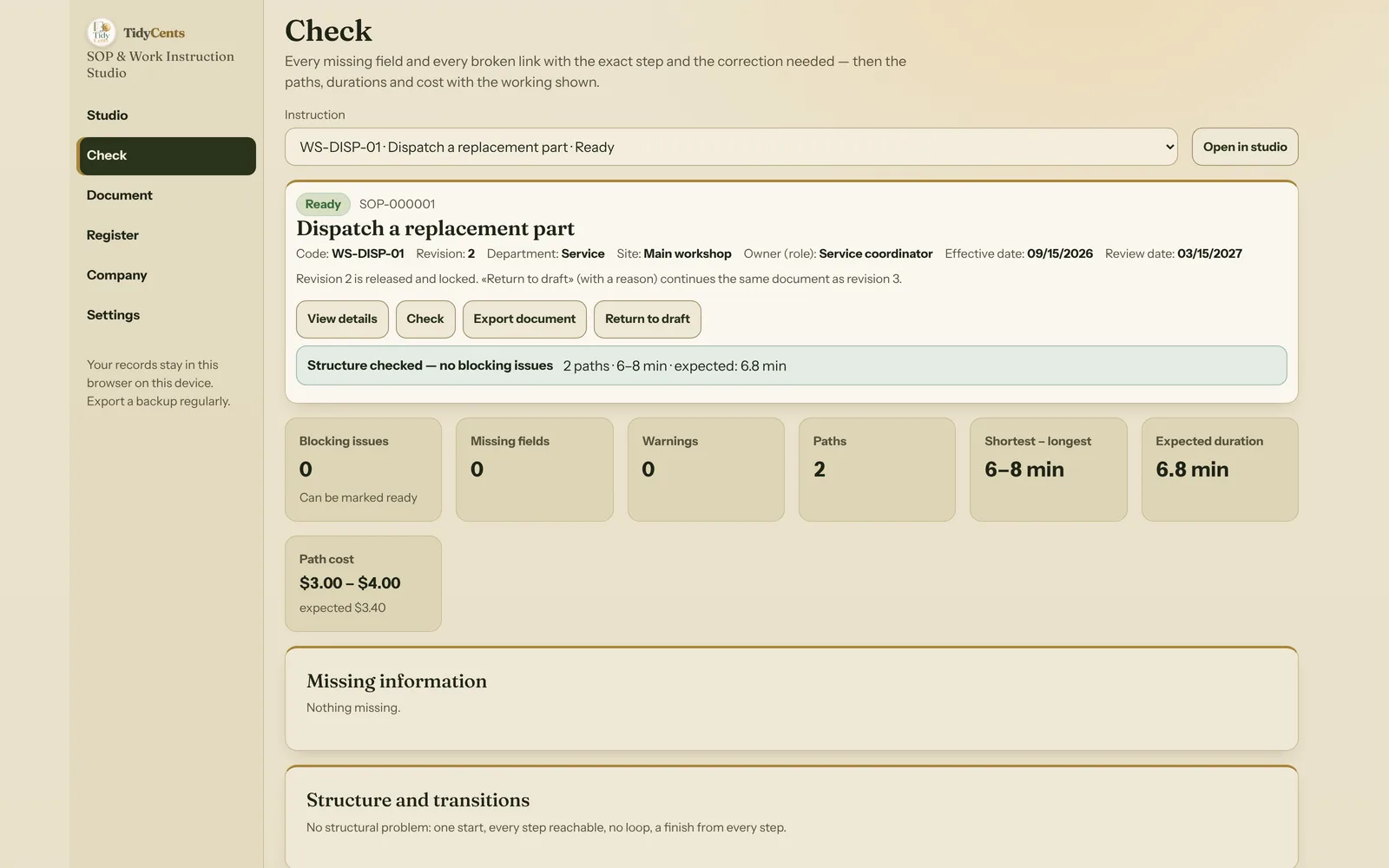
A good check looks for all three before a procedure is published: unique step ids, an existing next step for every action and outcome, exactly one start, every step reachable from it, no loops, and a finish reachable from every step. In SOP & Work Instruction Studio this is the Check screen; each problem names the step and the correction needed, instead of reporting a percentage of "quality".
Keep estimates honest
Durations are useful, but only if you know what they include. Suppose the dispatch procedure has these handling times:
- Check the approved request: 2 minutes
- Decision "Is the part in stock?": 0 minutes
- Pick and pack: 3 minutes — or order the part: 5 minutes
- Record the dispatch: 1 minute
There are two sequential paths:
- In stock: 2 + 0 + 3 + 1 = 6 minutes
- Order required: 2 + 0 + 5 + 1 = 8 minutes
If you explicitly assume a 60% chance that the part is in stock, the expected handling time is 2 + 0 + 0.6 × (3 + 1) + 0.4 × (5 + 1) = 6.8 minutes. With every role at $30 an hour, the paths cost $3.00 and $4.00, and the expected cost is $3.40.
Three cautions belong next to those numbers:
- The 6.8 minutes depends on the assumption. If nobody has entered a probability, there is no expected duration — only the shortest and longest paths. A probability is a scenario assumption, not measured reliability.
- Waiting is not included unless you enter it. The 5 minutes is ordering, not the supplier's delivery time. If waiting matters, add it as its own step.
- The longest path is not a promise. Eight minutes means "eight minutes of handling if each step takes what was entered", not "the job always finishes within eight minutes".
An unknown duration should stay unknown. If one step has no time entered, the total for every path through it is incomplete — not zero. A zero is a real zero only when someone typed 0.
Give each instruction an owner, a revision and a review date
A medium-sized business also needs ownership. With three departments and two sites, the question is no longer "is the procedure written?" but "which version is current, who looks after it and when is it due for review?"
Give each instruction:
- a code that is unique in your library,
- a department and site,
- an owner role that keeps it up to date,
- a revision and an effective date,
- a review date by which someone must look at it again.
Otherwise an updated procedure can coexist with an old printout without anyone knowing which one to follow. Keep the revision on the exported document. When a released instruction changes, it should become the next revision of the same document — with a reason — while the previous revision stays in the history exactly as it was printed.
Two documents from one saved procedure
People use instructions in two ways. Someone learning the task needs the full text: purpose, scope, inputs, every step with its criterion and image, the decision outcomes and the limits. Someone who already knows the task needs a short reference at the workstation: one line per step with the role and the "done when".
Both should come from the same saved snapshot. If they are maintained separately, they drift apart.
Where the tool fits
SOP & Work Instruction Studio connects the written sequence with structural checks and printable output. It helps a small team explain one recurring task and a larger team maintain a controlled library across departments and sites. It does not invent your procedure, and it does not replace a qualified review of the actual working method: a sequence can be structurally sound and still describe an unsafe method.
Open the fixed demo to inspect a complete sequence, the missing-owner warning in a 12-step supplier onboarding draft and the exported instruction. For planning who needs to learn the process, use Skills Coverage & Training Planner; for assigning ongoing ownership, use Organisation & Responsibility Map.
Checklist before you publish an instruction
- Trigger and expected result written first.
- One role and one completion criterion per action.
- Every decision outcome named, exclusive and linked to a step.
- No broken link, no loop without a finish, no unreachable step.
- Durations entered where known; waiting entered as its own step if it matters.
- Probabilities only where you are willing to state the assumption.
- Owner, department, site, revision, effective date and review date filled in.
This is decision support for your own procedures, not legal, safety or compliance advice.
Tools mentioned in this guide
 Interactive tool
SOP & Work Instruction Studio
Build clear work instructions for a small team or a growing multi-department business. Check missing steps, owners and decision paths before sharing the document.

