
Compare competitor offers without selling below your floor
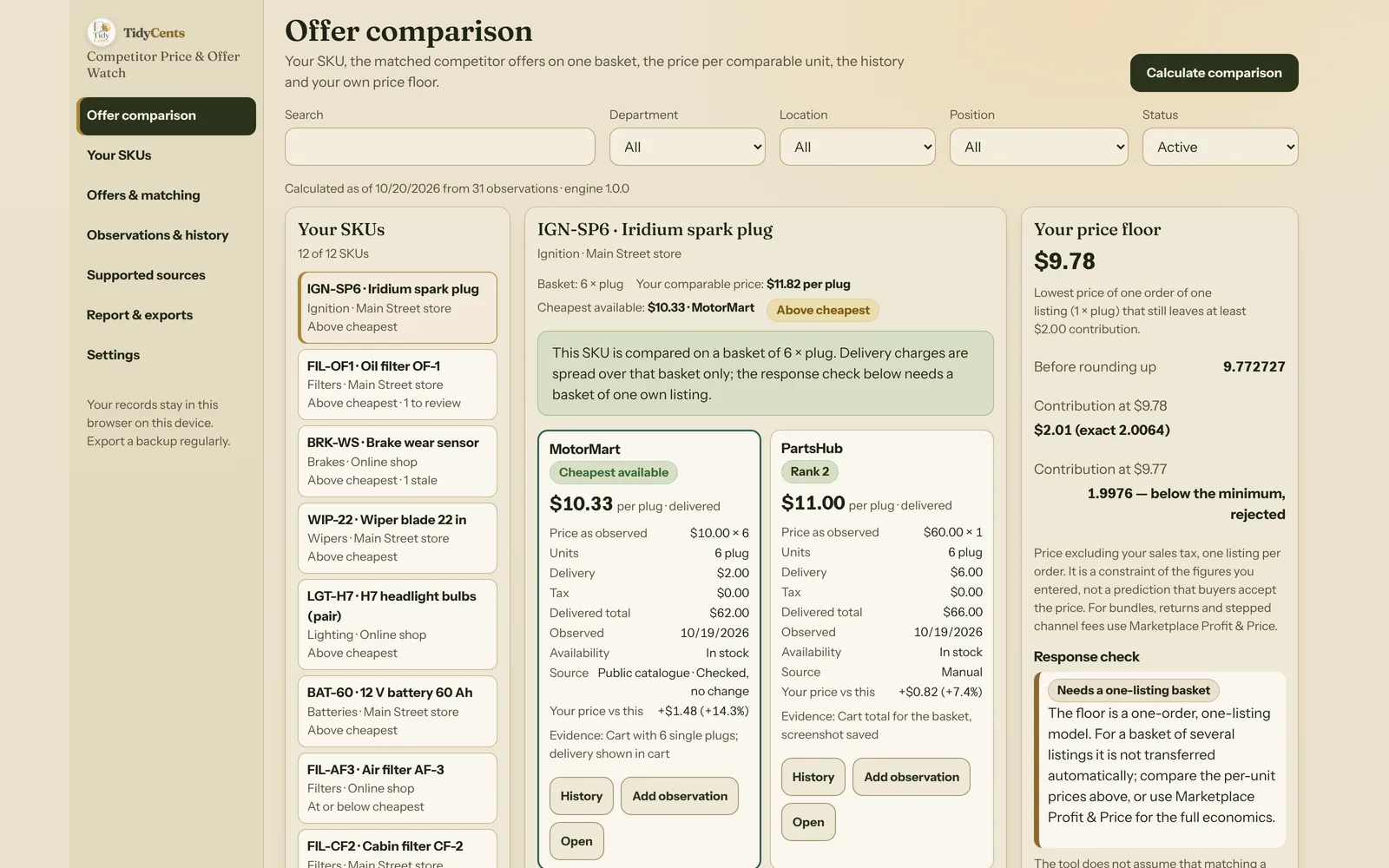
A competitor's smaller price tag does not establish a cheaper equivalent offer. The pack size, variant, order quantity, delivery charge and tax basis can change the comparison before your own margin is even considered — and once they are on the same basis, the question is no longer "who is cheaper?" but "can I respond without going below my floor?".
This article walks through the checks in the order that avoids the usual mistakes, with numbers from the fictional demo of Competitor Price & Offer Watch.
1. Match the product first
Similar titles can describe different sizes, materials or compatible models. An oil filter with an M20 thread and one with an M22 thread can share a name and a photo. Before any price is compared, confirm the specific variant and the number of physical units in the offer.
An unconfirmed match belongs in a review queue, not in the ranking. In the demo, AutoBay Direct lists an oil filter at $17.50 — the lowest price on the screen. But the thread size is not confirmed on the listing, so the offer stays visible with the label Match not confirmed and is not used as the cheapest available offer. A cheaper price on the wrong part is not a competitor price at all.
2. Compare one basket, not two price tags
Pick the quantity your customers actually buy and compare every offer on exactly that basket of physical units, including the delivery charge for that basket.
Suppose one supplier offers six spark plugs for $60 with $6 delivery. Its delivered price is $66, or $11.00 per plug. Another sells single plugs for $10 and charges $2 delivery for the six-unit order. That basket costs $62, or about $10.33 per plug.
| Offer | Pack | Packs | Units | Items | Delivery | Delivered | Per plug |
|---|---|---|---|---|---|---|---|
| A | 6 | 1 | 6 | $60.00 | $6.00 | $66.00 | $11.00 |
| B | 1 | 6 | 6 | $60.00 | $2.00 | $62.00 | $10.33 |
Comparing the raw $60 and $10 tags would miss the actual question. The 6-pack looks like the bargain; the single plugs are the cheaper basket. The ranking uses the exact value (10.333…), and the screen only rounds for display — so two offers that both show $10.33 are still ordered correctly.
A third offer in the demo is a 4-pack. Four plugs are not the six-plug basket, so it is shown as Different basket instead of being stretched to a per-plug price that nobody could buy at.
3. Keep tax treatment explicit
A price that already includes the stated tax must not have the same tax added again. If a 6-pack costs $60 including $10 of tax and $6 delivery, the delivered basket is $66, not $76. If the same $60 excludes tax and the tax for the basket is $10, the delivered basket is $76.
Where shipping or tax is unknown, label the result as an item-only comparison or an incomplete delivered price. Unknown is not zero. In the demo, one bulb offer shows no delivery charge on the product page; it appears in a separate item-only list and never in the delivered ranking, because a missing delivery charge is not free delivery.
4. Check availability and date
An unavailable offer does not set the cheapest available purchase. In the demo, MotorMart's oil filter at $18.99 is out of stock, so the cheapest available offer is PartsHub at $20.40.
Dates matter too. Yesterday's successfully observed price can remain useful after a failed refresh, but it must be labelled stale. In the demo, a catalogue check of one MotorMart page timed out; the last good price from 10 October stays on screen as Stale (refresh failed). A connection failure is not evidence that the seller has reduced the price to zero, and a missing variant is shown as not found, never as a price of 0.
5. Separate a competitor's change from currency movement
A price moving from 20 to 18 in its original currency fell by 10%. If the conversion rate also moved from 1.00 to 1.10, the price in your currency went from 20.00 to 19.80 — a fall of only 1%.
| Date | Price (EUR) | EUR→USD | Price (USD) |
|---|---|---|---|
| 6 Oct | 20.00 | 1.00 | 20.00 |
| 19 Oct | 18.00 | 1.10 | 19.80 |
| Change | −10% | −1% |
Both facts are true, and both matter: the competitor did cut its price, but your relative position barely changed. Keep both visible; never let an exchange-rate move pass as a price decision, or the other way round. Enter the rate you actually use, with its date in the evidence — an automatic rate would hide where the number came from.
6. Then calculate your own floor
Only now does your own price come in. For one order of one unit, the contribution of a price P is:
Contribution(P) = P × (1 − fee %) − unit cost − fulfilment per order − fixed fee
With $10 unit cost, $2 fulfilment, a $0.50 fixed fee, a 10% price fee and a $5 minimum contribution, the lowest price that still leaves $5 is (10 + 2 + 0.50 + 5) ÷ 0.90 = 19.444…, which rounds up to $19.45.
Then check it again after rounding:
- at $19.45 the contribution is $5.005 — the minimum is met (it displays as $5.01);
- at $19.44 it is $4.996 — below $5. It would display as $5.00, which is exactly why a rounded display must never be used as proof that the minimum is reached.
That floor is a constraint of the entered one-unit-order model. It is not a prediction that buyers will accept the price.
7. Decide on the response with the same basis
Bring your own price to the same basis as the competitor's delivered price: your displayed price, plus your sales tax rate as you entered it, plus the delivery you charge per order.
- Oil filter: your displayed price is $22.49; the cheapest available delivered offer is $20.40. Matching it means a displayed price of $20.40, which is above your floor of $19.45, with a contribution of $5.86 per order. You can respond — whether you should depends on your customers, not on the calculator.
- Wiper blade: the cheapest offer is $13.49 + $1.50 delivery = $14.99. Your floor is $16.25 (cost $7.80, fulfilment $2, fixed fee $0.50, fee 12%, minimum $4). Matching would mean $1.26 below your floor, with only $2.89 contribution. That is the case to hold the price, change the offer or accept the gap knowingly.
- Spark plugs on a six-unit basket: the one-unit floor is not transferred to a basket of six. The tool compares the per-plug prices and says plainly that the full economics of a multi-unit order belong in a fuller model such as Marketplace Profit & Price, with bundles, returns and stepped channel fees.
8. Do it for many SKUs without losing the evidence
A shop with a dozen parts can do this by hand. A business with 250 SKUs, five competitors and four branches needs the same rules applied every time: one basket per SKU, matches confirmed once, every reading kept with its source and date, filters by department and branch, and a printed comparison that shows the basket and exchange rate behind every number.
Competitor Price & Offer Watch connects dated equivalent offers with a transparent response-floor check. You can record observations by hand, import them from CSV or XLSX, or — in the full online tool, on request — refresh explicitly supported public catalogues. It does not read every website, does not get around protected or signed-in prices, and never changes a price in your shop. The offline version works with manual and CSV observations, history and calculations; refreshing supported public catalogues requires the online tool and internet access.
Open the fixed demo to inspect the 6-pack comparison, the stale observation and the $19.45 margin boundary. For bundles, returns and stepped channel tariffs, continue with Marketplace Profit & Price.
Tools mentioned in this guide
 Interactive tool
Competitor Price & Offer Watch
Compare like-for-like competitor offers, keep a dated price history and check whether your own response price still meets your minimum contribution.

