
Check local business details and measure changes honestly
An old phone number on one platform and a correct number on another create a practical problem for customers: some of them call a line nobody answers. Before buying more visibility reports, establish which details are supposed to be correct for each location and where the current information differs — with a date and a source for every observation.
This article walks through that discipline with the fictional demo of Local Visibility & Business Profile Desk: a bike workshop on four listing platforms, and a regional business with twelve branches.
1. Create a canonical record per branch
Keep the business name, the address policy, the phone, the website and the opening hours together, for each location separately:
- Name: Northfield Bike Workshop
- Street: 48 Mill Road, Unit 12 · Toronto · M4M 1A1 · Canada
- Phone: +1 416 555 0142 (always in international form)
- Website: https://northfieldbikes.example/
- Hours: Mon–Fri 09:00–18:00 · Sat 10:00–16:00 · Sun closed
A service-area business may intentionally hide its street address — a mobile repair van, a cleaning team. That should not be treated as a missing storefront address. In the tool such a street is not applicable, so a listing without it is not flagged.
The canonical record is entered by you. It is never taken from the first page you find, because that page may be the one that is wrong.
2. Record what you actually observed
A listing snapshot needs a date, a platform and a source. Without those, a report can combine last month's phone number with this week's opening hours and present them as one current problem.
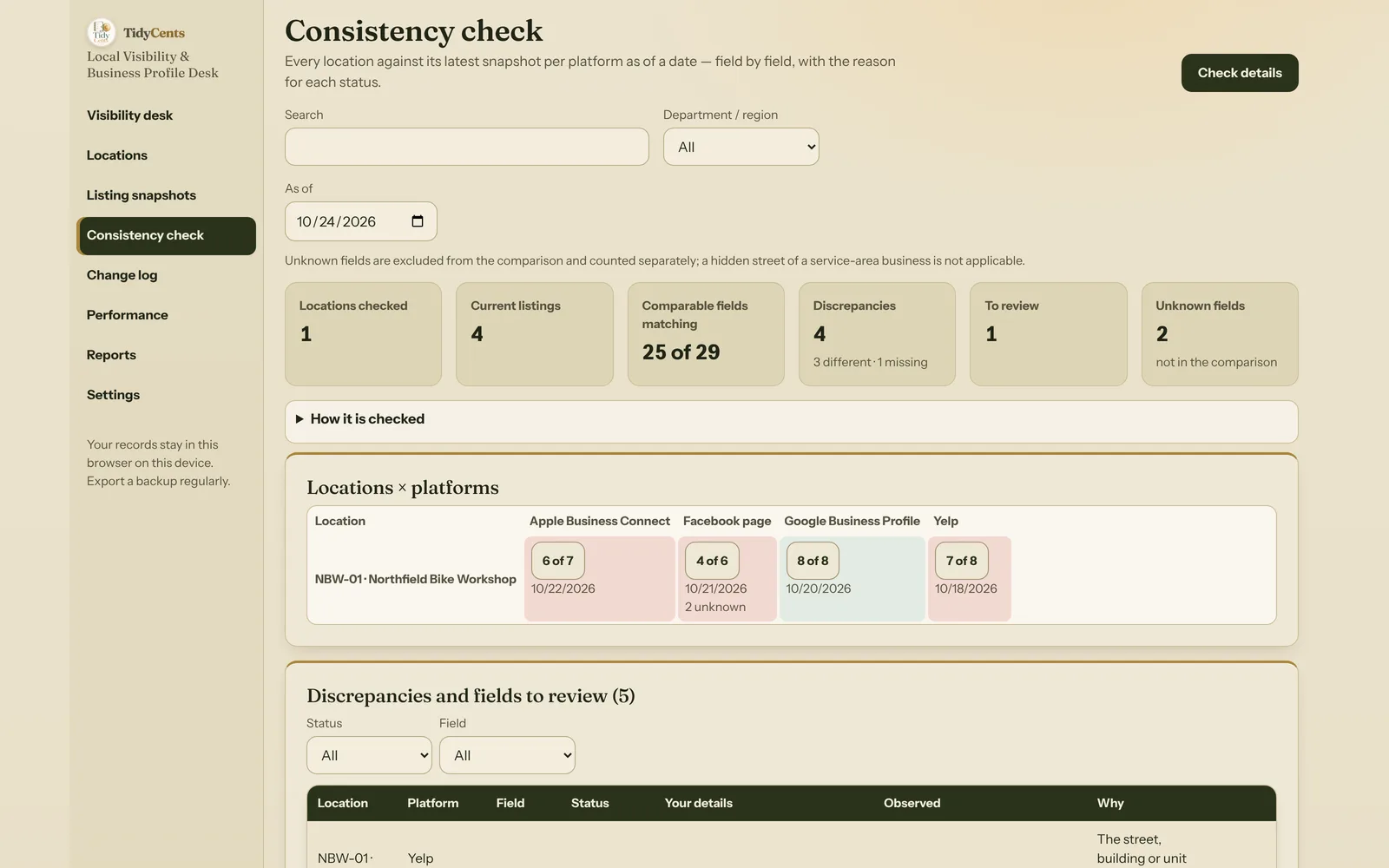
In the demo, the workshop has five snapshots:
| Platform | Observed | What it showed |
|---|---|---|
| Google Business Profile | 10 Oct | the previous owner's phone number |
| Google Business Profile | 20 Oct | everything correct (after a fix on 12 Oct) |
| Yelp | 18 Oct | "Unit 21, 48 Mill Road" |
| Facebook page | 21 Oct | old phone, no website; postal code and hours not checked |
| Apple Business Connect | 22 Oct | http instead of https; Saturday until 17:00 |
For a report dated 24 October, each platform contributes its latest snapshot on or before that date. The 10 October snapshot stays in the history but is not "current"; asked for 15 October instead, the report would use it. A snapshot dated later than the report date never changes that report.
3. Normalise cautiously
Some differences are only formatting:
- " Northfield bike workshop " and "Northfield Bike Workshop" are the same name once extra spaces and letter case are ignored.
- "M4M1A1" and "M4M 1A1" are the same postal code.
- "Unit 12, 48 Mill Road" and "48 Mill Road, Unit 12" list the same parts in another order.
Other differences are real and must survive normalisation:
- "Unit 12" and "Unit 21" are different premises. Digits, unit numbers and accents are never removed.
- A phone number needs a country before it can be compared. "(416) 555-0142" read as a Canadian number becomes +14165550142 and matches the canonical phone; the same digits without a country are marked needs review instead of being guessed.
- Links: scheme and host letter case, default ports, fragments and the five utm_ tracking parameters can be ignored. Other query parameters cannot — "?color=red" may be a different page — and the path stays case-sensitive: "/Shop" is not "/shop". http vs https is shown for review: often one redirects to the other.
- Opening hours are compared as intervals of the local week. An overnight interval such as 22:00–02:00 belongs partly to the next day. No holidays are assumed.
4. Keep the comparison readable
Here is the Facebook page snapshot from the demo, field by field:
| Field | Status |
|---|---|
| Name, street, city, open status | match (4) |
| Phone | different — 416-555-0199 vs +1 416 555 0142 |
| Website | missing — the page does not show one |
| Postal code, hours | unknown — not checked |
The result is "4 of 6 comparable fields match · 2 unknown". That is a specific statement. Calling it a visibility score, or "4 of 8", would say more than the data supports: the two unknown fields were simply not looked at. Unknown fields belong in their own category, as do fields where your own canonical value is not entered yet.
Across all four current snapshots the workshop has 25 of 29 comparable fields matching, four discrepancies (the old phone, the missing website, Unit 21 and the longer Saturday) and one link to review. Each one is listed with the snapshot it comes from, so you can open the evidence before you change anything. None of them is a "Google penalty" — only a difference from the details you entered.
5. Review performance by definition
Profile exports count different things, and the words matter:
- A click on a call button is not proof that a conversation happened.
- A request for directions is not a completed visit.
- Daily unique-view counts cannot be summed and renamed unique people for a whole month: 100 + 120 daily counts make 220 daily counts, not 220 different people.
- Reports may contain paid as well as organic activity.
- A missing value is not zero. In the demo the views export for 1–14 October is empty, so the October views are "not available" and no change in views is calculated.
Each figure is therefore kept with its source, definition and date range, and only figures with the same source and definition are compared.
6. Compare periods consistently
If website clicks rise from 300 to 360 over equal complete 30-day periods (1–30 August and 15 September – 14 October), the increase is 60 clicks or 20 %, from ten to twelve per day. The calculation is plain:
- per day before = 300 ÷ 30 = 10
- per day after = 360 ÷ 30 = 12
- change = 360 − 300 = +60
- change in % = 60 ÷ 300 = +20 %
Two rules keep it honest. A percentage is only calculated from a positive starting value: going from 0 to 5 is shown as "from zero", never as an infinite percentage. And if two rows of the same location cover overlapping dates, the total is blocked instead of counting those days twice.
The workshop recorded three changes between the periods — longer Saturday hours on 5 September, "e-bike repair" in the description on 8 September and the corrected phone on 12 October. They appear next to the figures on the timeline. That is an observation. It does not prove that a particular profile edit produced the extra clicks: the season, weather, a local event or a competitor closing can all move the same number.
7. Apply the same discipline to every branch
For a medium-sized business the same rules apply location by location. In the second demo, twelve auto-service branches in three regions each keep their own canonical phone and hours. One directory lists the head-office number for the Duluth branch; another shows a depot street for the mobile service whose street is hidden on purpose — not applicable, not an error. Across 36 current listings, 276 of 281 comparable fields match and five fields differ.
A central correction should not overwrite legitimate location-specific details. Replacing all twelve phone numbers with the head-office number would "fix" one listing and break eleven. Corrections are recorded per branch and per field, and the regional comparison shows each branch beside the total.
Summary
- Write down the correct details per location, including a deliberately hidden street.
- Record dated snapshots with their source and evidence; never mix dates into one "current" view.
- Normalise only what is formatting; keep unit numbers, country codes and paths.
- Report "x of y comparable fields match" and keep unknown fields separate.
- Compare performance only within one source and definition, per complete day, and treat recorded changes as context, not cause.
Local Visibility & Business Profile Desk keeps canonical records, evidence and comparisons together. Open the fixed demo to inspect the mismatches and a transparent before-and-after report — or see Lead & Quote Recovery Desk for following up the enquiries those listings bring in.
Tools mentioned in this guide
 Interactive tool
Local Visibility & Business Profile Desk
Keep business details consistent across locations and listings, then review profile performance alongside your recorded changes.

