
Plan cross-training with real time and cost
A skills gap is not closed by putting a course in a calendar. The business needs a person who can demonstrate the required capability when the work needs to happen. That is why it pays to treat three things separately: the evidence you have today, the training plan that might change it, and the time and money the plan really uses.
The example below comes from the fictional demo of Skills Coverage & Training Planner — a print works with eight people and four skills. Every number in it is what the tool calculates from those records.
1. Define a requirement you can assess
Instead of "good with machinery", name the operation and the level required. In the demo the requirement reads:
- Forklift operation — required level 3 on a 1–5 scale, at least 2 qualified people, and the skill needs an expiry date (it is a licence-type skill).
For every person you then record the evidence: the level, how it was shown ("practical check by supervisor"), the date it was verified and, where qualifications expire, the date it runs out. The expiry date matters as much as the original result.
2. Count confirmed people, not course bookings
Three people have a forklift record on 24 October:
| Person | Record | Counts? |
|---|---|---|
| Ana | Level 3, confirmed, valid until 31 October | Yes |
| Ben | Level 2, confirmed | No — below level 3 |
| Chloe | Level 4, not confirmed | No — not confirmed |
So on 24 October there is one qualified person against a minimum of two: the gap is one. Chloe's level 4 looks better on paper, but until someone checks it and records the evidence it is not a qualification.
The date matters too. On 1 November Ana's licence has expired, nobody counts any more and the gap becomes two — even though nothing else changed. A matrix that only shows today would hide that.
Ben is booked on a course that ends on 30 October. That booking does not change the count on 24 October. A planned course is a possible future, not a current fact.
3. Include the time of the trainer
Ben's course looks cheap if you only see the invoice. Put every part on the same line:
- trainee time: 4 hours × $20 per hour = $80
- mentor time (Ana supervises the practice): 2 hours × $30 = $60
- external course fee: $100
- materials: $10
- travel: $0
Total: $250. Before fees and materials the internal time alone is $140. Omitting the mentor would understate the resources the course really takes — and the mentor is usually your most experienced person.
One more rule keeps the numbers honest: the external fee is only what you pay an outside provider. Your own people's time is counted from the hours, so it is never counted twice.
If you do not know someone's hour cost, leave it empty. The option then shows "missing information" instead of pretending the time is free.
4. Keep shared expenses distinct
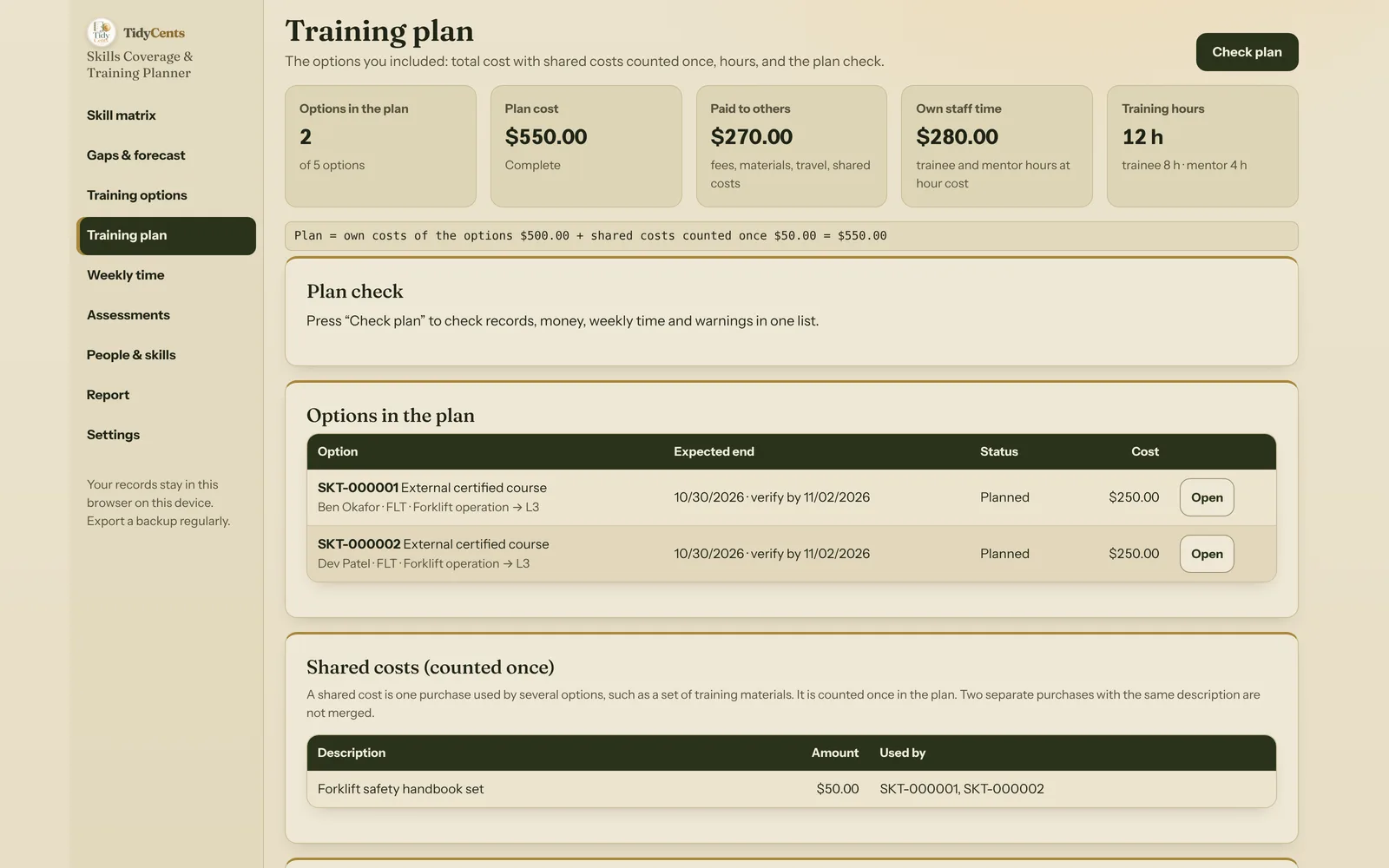
A second person, Dev, takes the same $250 course in the same week. Both courses use one set of forklift safety handbooks costing $50.
If each course carried its own $50, the plan would show $600. But there is only one purchase. Entered once as a shared cost and referenced by both courses, it is counted once:
$250 + $250 + $50 (shared, once) = $550, not $600.
The opposite mistake is just as real: two separate purchases that happen to have the same description should not be merged. That is why the tool only merges what you link to one shared-cost record, never by matching names.
5. Check the week, not just the total
Hours have to happen in a real week. A senior employee may have time to mentor during one period and none during another, and the same person can be a trainee and a mentor at once — both commitments use the same available time.
In the medium-sized demo (180 people in 5 departments and 3 sites), a maintenance lead is reserved 10 hours of training time in the week of 9 November. In that week he is booked for 6 hours as a trainee on a PLC fault-finding course and 6 hours as the mentor on a colleague's electrical-isolation course:
6 h + 6 h = 12 h needed against 10 h reserved → 2 hours over.
Checking each category on its own ("6 is less than 10, 6 is less than 10") would miss the conflict. The check adds both roles together.
Two more rules make the weekly check useful:
- Hours are allocated explicitly. If a 6-hour course runs over two weeks, you say how many hours fall in each week. Nothing is spread evenly behind your back, and if the weeks add up to 4 hours instead of 6 the plan check says so.
- Unreserved time is not free. If hours fall in a week where nothing was reserved for that person, the tool reports "no time reserved" rather than treating the capacity as zero or unlimited.
6. Keep the future conditional
What does the plan achieve? On the forecast date the tool starts from the people who will still be valid on that day — expiries remove them — and then adds only included trainings that end on or before the date and reach the required level. Each person counts once per skill.
For the forklift skill in the demo:
- 29 October: the courses end on 30 October, so nothing is added — projected 1 (Ana).
- 31 October: Ana is valid until that day, and Ben and Dev could be added — projected 3.
- 1 November: Ana's licence has expired, so the projection is 2 — and still only if the training is completed and verified.
That last phrase is the point. A completed course is still not a qualification until somebody checks the result and records a new, confirmed assessment. The report prints current evidence, records that do not count (expired, not confirmed, missing an expiry date) and the conditional forecast in separate sections, so nobody reads a plan as a fact.
7. Departments and locations
A larger business also needs to distinguish departments and locations. In the medium demo, choosing one department and one site shows only those people and the skills that apply there; the minimum is checked in that view. Across the whole business the demo shows 12 expiry warnings — qualified people whose records run out within 60 days — before they turn into gaps.
The count of people with a skill is useful, but it is not a guarantee that every shift is covered. It does not know who is on leave or working at the same time. Availability and simultaneous demand need their own scheduling check.
A short checklist
- Write each requirement as an operation, a level and a minimum number of people.
- Record evidence with dates and expiries; do not count unconfirmed levels.
- Price every option with trainee and mentor time; leave unknown costs empty, not zero.
- Link shared purchases once; never merge separate purchases by name.
- Allocate hours to real weeks and compare both roles against reserved time.
- Read the forecast as conditional until new evidence is recorded.
Skills Coverage & Training Planner makes the current gaps, the expected outcomes and the cost of a selected plan visible, with every formula on screen — no AI guesses. Open its fixed demo to inspect a training option, an expiry and a mentor conflict. For the different question of covering actual absences, use Leave Balance & Coverage Planner.
Tools mentioned in this guide
 Interactive tool
Skills Coverage & Training Planner
See which skills your team can demonstrate today and what it would cost to close the gaps through training.

