
Repair shop job tracking: intake to profit per repair
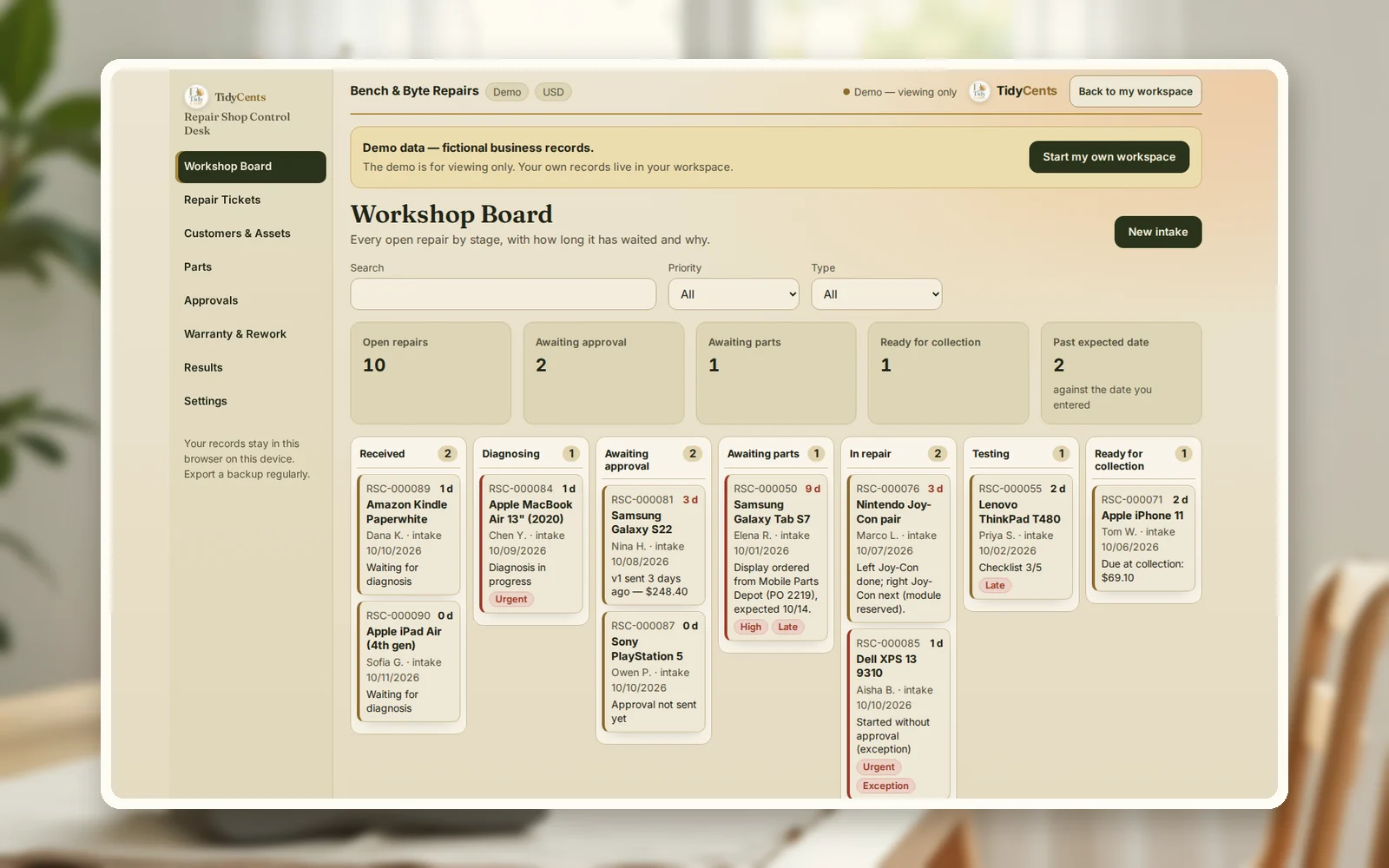
Good repair shop job tracking means every device has one ticket from intake to collection, with its condition written down, a customer-approved price before work starts, the parts and minutes actually used, and any warranty rework linked back to the original repair. That last part is where the money hides. In the example below, a phone screen repair that earned $80 of contribution needed a free fix a month later; its real result is $55. Another ticket shows why a written price increase matters: a laptop job grew from $140.40 to $194.40 mid-repair, and the shop has the customer's approval on record.
Why repair shops lose money between intake and collection
Most lost money in a small repair shop is not a bad repair. It is missing paperwork:
- Condition not recorded at intake. A scratch or a bent frame the customer later says was not there.
- Price agreed only verbally. The repair turns out bigger, and there is no record of what the customer accepted.
- Parts and time not counted. Without them, a "busy" week can still be a thin one.
- Rework not linked. A free warranty fix lands on a new ticket, and the original repair still looks profitable.
- Devices waiting without a reason. A board full of "in progress" hides which ones are blocked on parts or on the customer.
The numbers per repair
- Net repair revenue = charges to the customer without tax − refunds or goodwill credits.
- Parts cost = parts used, at what they cost you (first in, first out), minus parts returned to stock.
- Labour cost = minutes ÷ 60 × your cost rate per hour.
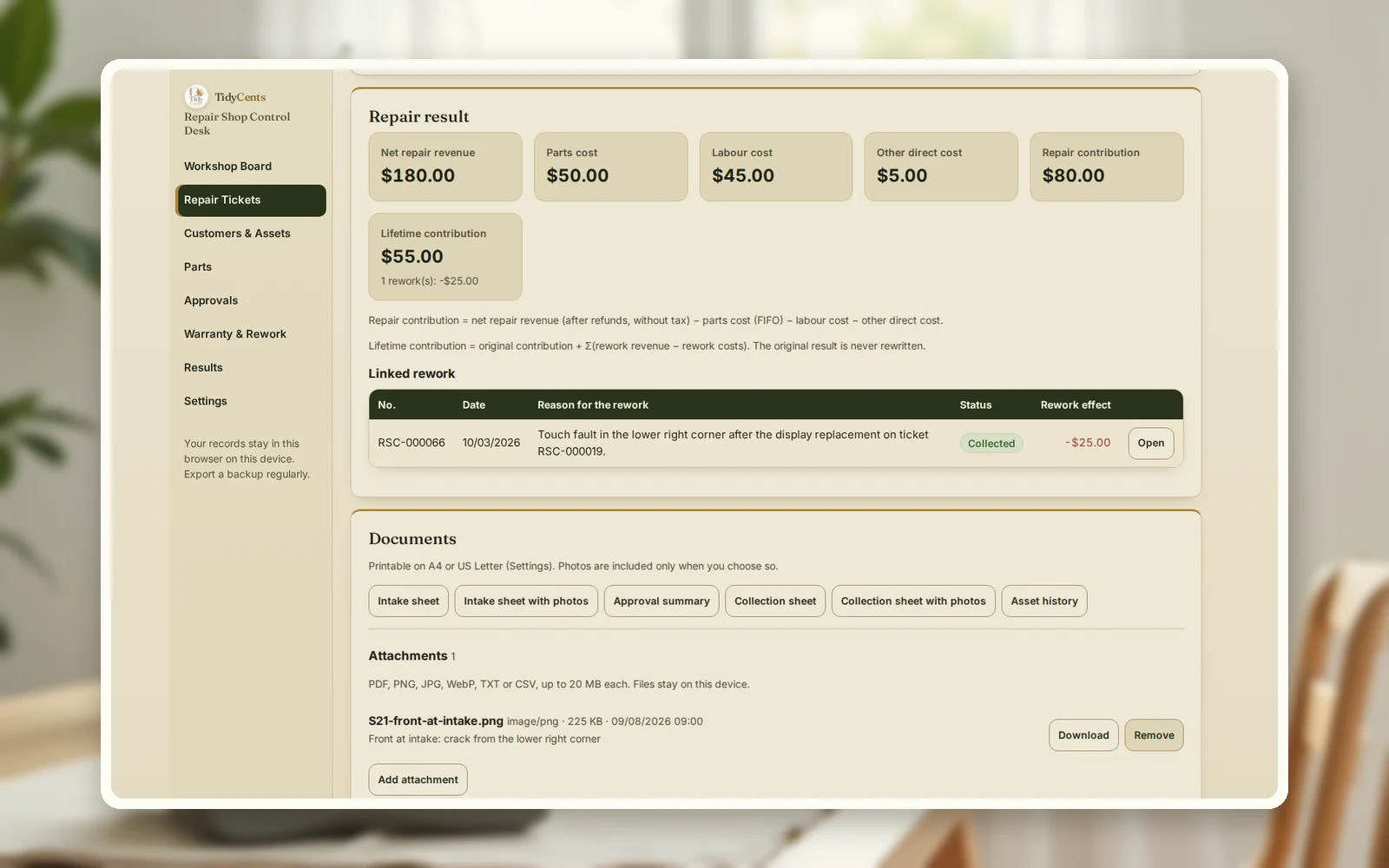
- Repair contribution = net repair revenue − parts cost − labour cost − other direct costs (courier, outsourced work).
- Lifetime contribution = original contribution + Σ(rework revenue − rework costs). The original result is kept; rework is added on top.
- Approval gap = charges − (agreed amount + the extra amount the customer allowed). Above zero, you need a new approval before you continue.
A worked example
The numbers are the demo of Repair Shop Control Desk: a fictional small electronics repair shop with phones, laptops, tablets and consoles on the board. Labour is costed at $30 per hour, and prices include 8% tax.
A screen repair, then a warranty fix. A Galaxy S21 came in on 8 September with a cracked display. The intake records the case, the crack from the lower right corner and a scuffed frame. The customer approved $194.40 in person.
| Line | Amount |
|---|---|
| Charge (incl. tax) | $194.40 |
| Net repair revenue | $180.00 |
| Display assembly and adhesive | −$50.00 |
| Labour, 90 minutes | −$45.00 |
| Courier share for the part | −$5.00 |
| Repair contribution | $80.00 |
On 3 October the customer was back: touch did not respond in the lower right corner. The display flex cable had been seated badly. The fix was free under the shop's warranty, which runs to 11 December, and cost $10 in parts and 30 minutes of labour ($15). Linked to the original ticket, the rework shows −$25, and the screen repair's lifetime contribution becomes $55.
A price that grew, with approval. A ThinkPad T480 came in because the battery died after 20 minutes and it charged only at an angle. The customer approved $140.40 for a new battery and allowed up to $10 extra without asking. During the repair the DC power jack turned out to be loose too — $54 more. That is above the allowed extra, so the shop sent a second version: $194.40, approved by phone on 6 October. The job used 105 minutes of labour and ends at $81.20 of contribution.
A declined repair that still paid for its time. A Pixel 6 stuck in a boot loop needed a board repair for $162, close to the phone's value. The customer declined. The $21.60 diagnostic fee covered 20 minutes of diagnosis and left $10 of contribution instead of a loss.
A goodwill credit counted honestly. A PlayStation 5 HDMI port repair was ready a day later than promised, and the shop gave back $10.80. The repair still contributed $110.80, and the credit is visible on the ticket rather than lost in the till.
Step by step: track a repair from intake to collection
- Open a ticket at intake with the device, serial or tag, accessories, the reported fault and the visible condition — with photos if you can.
- Diagnose and write the scope and price. Ask how much extra the customer allows without a new call.
- Get approval before work starts, and note how: in person, phone, email or message.
- Reserve and use parts against the ticket, so stock and cost stay right.
- Record your minutes for diagnosis, repair and testing.
- If the price must rise beyond the allowed extra, stop and send a new version. Continue when it is approved.
- Test with a checklist, record the result and the warranty date, and hand the device back with a collection record.
- Link any rework to the original ticket, so its lifetime result shows the real outcome.
Common mistakes
- Skipping the condition notes. A two-line description at intake saves an argument at collection.
- Starting work on a verbal "go ahead". Record the approval and the amount, even when the customer is standing at the counter.
- Charging diagnosis as free by default. If you decide to, do it on purpose; time spent is still a cost.
- Ignoring labour minutes. Parts margin alone overstates a repair that took two hours.
- Opening warranty work as a new, unrelated job. The original repair then looks better than it was.
- Leaving "waiting" tickets without a note. Write what each device is waiting for — a part, the customer, a test.
When a tool helps
A paper book and a spreadsheet work while the board is small. With a dozen devices in different states, parts reservations, approvals that change, deposits and warranty returns, it becomes hard to see what is blocked and what each job earned. Repair Shop Control Desk keeps the workshop board, intake and collection sheets, approval versions, parts stock with first-in-first-out costing, labour minutes, payments and linked rework in one place, and shows the contribution of every repair and its lifetime result. Exact decimal arithmetic, no AI guesses. To see what rework and warranty claims cost across the whole business, see Quality, Rework & Warranty Profit Control.
Open the demo with the repair shop above — every screen, no sign-up — then add your own devices and tickets.
Open Repair Shop Control DeskAll sales and daily operations tools
Related guides: the cost of poor quality, how to follow up on a quote and the true cost of a return.
FAQ
What should a repair ticket include?
The customer and device, a serial or tag number, accessories left with it, the reported fault, the visible condition at intake, the diagnosis, the approved scope and price, parts and minutes used, the test result, the warranty date and who collected it.
How do I calculate profit per repair?
Take the charge without tax, subtract refunds, the cost of the parts used, your labour minutes at your cost rate, and any other direct cost such as a courier. In the example, a $194.40 screen repair leaves $80 of contribution: $180 net, minus $50 parts, $45 labour and $5 courier.
Should I charge for diagnosis?
Many shops do, and it is easier to agree at intake than after a declined quote. In the example, a $21.60 diagnostic fee turned a declined board repair into $10 of contribution instead of a loss of the diagnosis time.
What if the repair costs more than the approved price?
Stop before you exceed what the customer agreed, plus any extra they allowed, and send a new version with the reason. Continue when it is approved, and keep the record.
How do I account for warranty rework?
Open it as rework linked to the original repair. Its parts and labour reduce the original job's lifetime contribution, so you see what the repair really earned and which repairs come back.
Do I need a separate stock system for parts?
Not if parts are reserved and used against tickets with their purchase cost. That keeps the stock count right and gives each repair its real parts cost.
This is decision support, not legal, tax or consumer-rights advice.


