
CAM reconciliation: how to check your landlord's CAM charges
To check a CAM reconciliation, rebuild the landlord's numbers from your lease: start from the recoverable expense pool, apply gross-up, the admin fee, the cap and any base year or expense stop in exactly the order the lease states, multiply by your share, and subtract the advances you paid. Then compare the result line by line with the statement. Where the lease is unclear about a cost, show the result as a range and ask — an unclear item is a question, not proof of an error. In the example below, the same $100,000 pool gives a tenant charge of $10,500 or $11,025 depending only on whether the cap comes before or after the admin fee.
Why CAM bills are hard to check
A year-end statement is one number built from many steps:
- Order changes the result. A cap applied before or after the admin fee gives different charges.
- Gross-up applies to variable costs only. Grossing up fixed costs inflates the pool.
- Caps come in two kinds. Cumulative and non-cumulative caps give very different limits.
- Some costs are not recoverable. Capital projects and similar items depend on the lease wording.
- Your share moves. Area changes and partial years change the share during the year.
The formula
- Gross-up = fixed costs + variable costs × max(1, target occupancy ÷ actual occupancy).
- Admin fee = fee rate × the base your lease names.
- Cap limit = last year's amount × (1 + rate) for a non-cumulative cap, or the base-year amount × (1 + rate) for each year since, for a cumulative one; allowed = the lower of the pre-cap pool and the limit.
- Your share = your area ÷ the lease's denominator × days occupied ÷ days in the year, or the fixed percentage in the lease.
- True-up = allowed pool × your share − advances paid − credits.
A worked example
A simple lease: a 10% fixed share, gross-up of variable costs to 95% occupancy, a 5% admin fee, and a non-cumulative 5% cap on the pool including the fee, based on last year's actual $100,000. This year's costs are $40,000 variable and $60,000 fixed, and the building was 80% occupied. You paid $9,000 in advances.
| Step, in the lease order | Calculation | Pool |
|---|---|---|
| Expense pool | $40,000 + $60,000 | $100,000 |
| Gross-up | $60,000 + $40,000 × 95 ÷ 80 | $107,500 |
| Admin fee 5% | $107,500 + $5,375 | $112,875 |
| Cap 5% on last year | limit $100,000 × 1.05 = $105,000 | $105,000 |
| Your share 10% | $105,000 × 10% | $10,500 |
| True-up | $10,500 − $9,000 advances | $1,500 due |
If the lease instead applies the cap before the admin fee, the capped pool is $105,000, the fee is $5,250, the pool becomes $110,250 and your charge is $11,025: a true-up of $2,025, or $525 more for the same costs.
Cumulative or non-cumulative? Take a base-year amount of $100,000, a 5% cap, last year's actual $80,000 and this year's pre-cap $120,000. A cumulative cap two years after the base year allows $100,000 × 1.05 × 1.05 = $110,250. A non-cumulative cap on last year's actual allows $80,000 × 1.05 = $84,000. The lease decides which one applies.
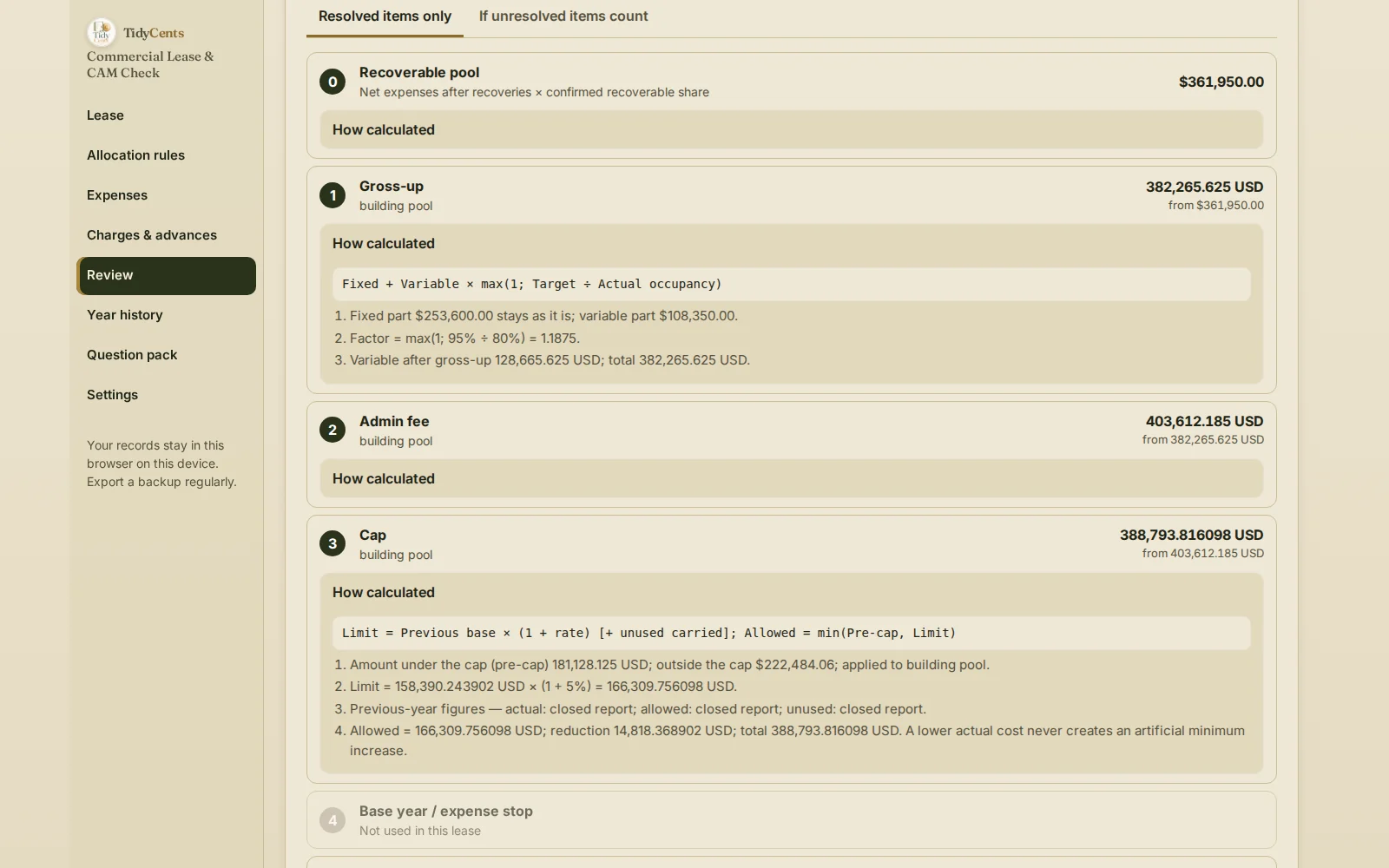
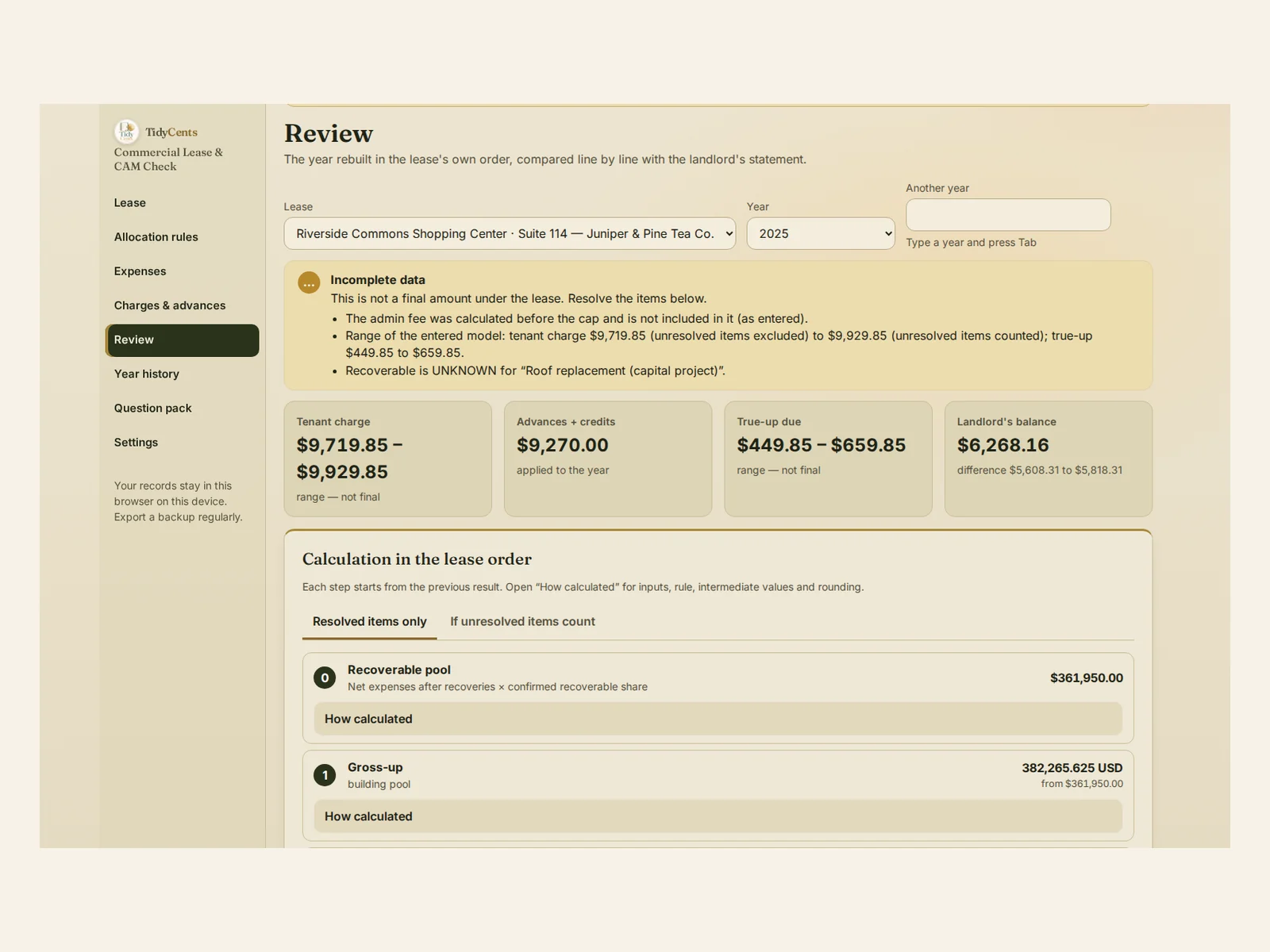
What the demo shows. In the demo of Commercial Lease & CAM Check, a tea shop in a shopping center has a recoverable pool of $361,950. Gross-up applies only to the variable part, $108,350, with a factor of 95% ÷ 80% = 1.1875. Whether a roof replacement can be recovered is marked unknown, so the tenant charge is shown as a range, $9,719.85 to $9,929.85, not as a final amount. With $9,270.00 of advances and credits, the true-up is $449.85 to $659.85. The landlord's statement asks for $6,268.16 — $5,608.31 to $5,818.31 more than the rebuilt figure — which becomes a documented request for supporting information.
Step by step: check a CAM reconciliation
- Enter the lease terms with the clause and page for each: share or area and denominator, proration, statement and objection deadlines.
- Classify each cost category: recoverable, controllable, variable and in the admin-fee base — yes, no or unknown.
- Write the order of operations the lease uses for gross-up, admin fee, cap and base year or expense stop.
- Enter the year: invoices with recoveries, advances, credits, actual occupancy and the landlord's statement.
- Rebuild the charge step by step and keep unclear items as a range.
- Compare line by line: correct, arithmetic difference, classification question or missing document.
- Send questions before the objection deadline, with the calculation and the clause.
- Close the year with a stored report, so later corrections do not rewrite it.
Common mistakes
- Applying steps in the wrong order. The lease order is part of the calculation.
- Grossing up fixed costs. Only the variable part moves with occupancy.
- Using the wrong cap type. Cumulative and non-cumulative limits can differ by thousands.
- Missing the objection deadline. A late question may not be accepted.
- Treating an unclear item as an overcharge. Ask for support instead of asserting an error.
- Ignoring advances and credits. The true-up is what remains after them.
When a tool helps
A spreadsheet can multiply a pool by a share. It rarely keeps the lease's order of operations, separates variable from fixed costs for gross-up, handles cumulative and non-cumulative caps, shows unresolved items as a range and turns each difference into a question with its clause. Commercial Lease & CAM Check does, and every step opens to its inputs and rounding. It calculates the terms you enter; it does not interpret ambiguous lease language or decide whether a charge is legally recoverable. Exact arithmetic, no AI guesses. To keep renewal and notice dates in view, see Contract Renewal & Obligation Control.
Open the demo with the tea shop above — every screen, no sign-up — then enter your own lease and year.
Related guides: contract auto-renewal notice periods, lease or buy equipment and how long can my business survive without sales.
FAQ
How is a CAM true-up calculated?
Take the allowed pool after gross-up, admin fee, cap and any base year, multiply by your share and subtract the advances and credits you paid. In the example, $10,500 − $9,000 = $1,500.
What is a CAM gross-up?
An adjustment that raises the variable part of the costs to what it would be at the target occupancy named in your lease, when the building is less occupied than that. Fixed costs stay as they are.
What is the difference between a cumulative and a non-cumulative CAM cap?
A cumulative cap grows from a base-year amount each year; a non-cumulative cap grows from last year's figure. In the example, the limits are $110,250 and $84,000.
What should I do if a CAM charge looks wrong?
Rebuild it from your lease, separate arithmetic differences from questions about classification, and send a documented request for supporting information before the objection deadline in your lease.
This is decision support, not legal advice: recoverability under your lease and local law is outside the tool's scope.
Tools mentioned in this guide
 Interactive tool
Commercial Lease & CAM Check
Reconstruct CAM and operating-expense charges from your lease terms, payments and supporting records.

