
How to reconcile FBA lost inventory and reimbursements
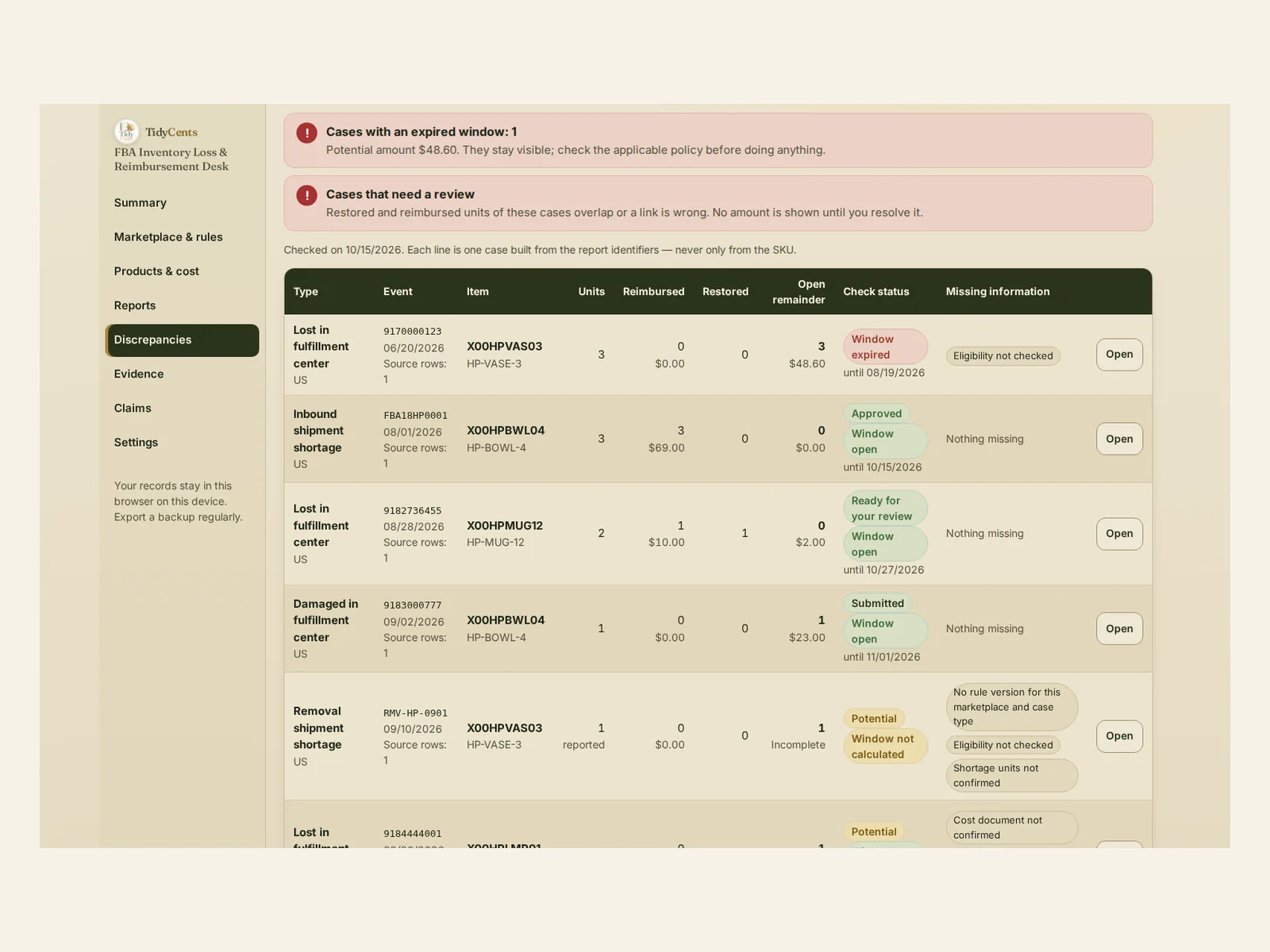
To reconcile lost FBA inventory, build one case per source event — a ledger reference, a shipment or a removal order, with its FNSKU — then subtract the units that were restored and the units that were reimbursed and not reversed. What remains open is valued on the cost base that the applicable reimbursement policy accepts, not on your full landed cost, and each case keeps its own claim window. In the example below, 2 lost mugs turn out to have 0 open units but a $2.00 valuation difference, and a shipment with 3 missing units is not ready to claim until its waiting period ends.
This is an independent tool, not affiliated with Amazon. You submit claims yourself, and eligibility depends on the applicable Amazon policy and your evidence.
Why FBA losses are hard to reconcile
Missing units, restored stock and reimbursements arrive in different reports at different times:
- The same SKU can have several losses. Merging them hides which one is still open.
- Units come back. A unit marked lost may later be found and restored.
- Reimbursements can be reversed. Money received is not final until the reversal window has passed.
- Reports overlap. Importing the same report twice can double units and money.
- Windows expire. A case that is never checked can quietly run out of time.
The formula
- Open units = affected − restored − (reimbursed − reversed).
- Unpaid value = open units × eligible cost per unit.
- Valuation difference = reimbursed units × eligible cost per unit − cash received for them.
- Landed cost = eligible cost + shipping, duties, prep and other costs — shown for reference, never claimed automatically.
- Claim window = from the start event plus the waiting period to the last day, as set in the rule version you enter.
A worked example
The numbers come from the demo of FBA Inventory Loss & Reimbursement Desk, a fictional home-goods seller. The rule versions in the demo are example values entered by hand; with your own records you enter each rule from the policy that applies to you.
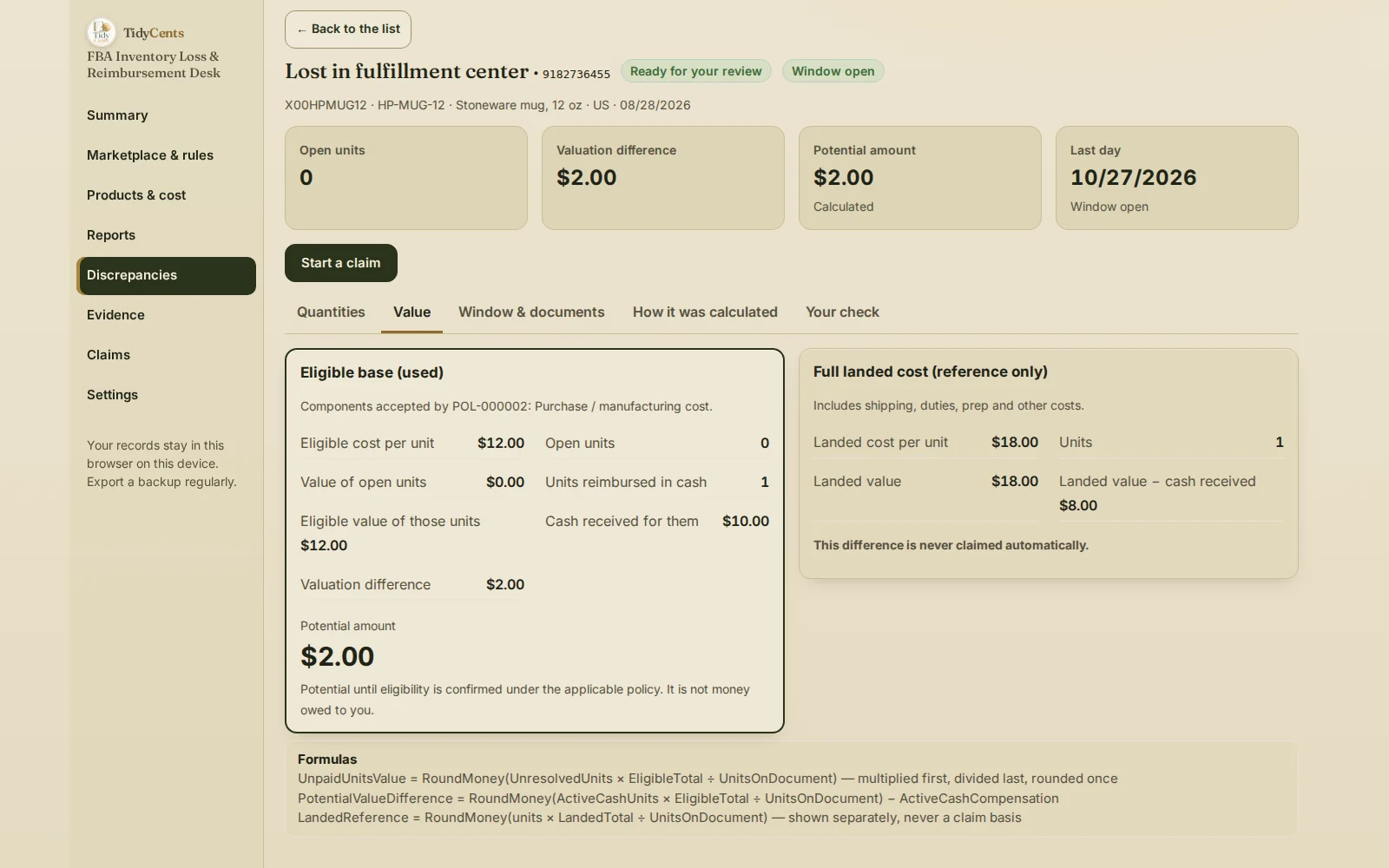
Lost, restored, reimbursed. The ledger shows 2 stoneware mugs lost in a fulfillment center. 1 is later found and restored, and 1 is reimbursed for $10.00.
| Step | Units | Value |
|---|---|---|
| Lost | 2 | — |
| Restored | −1 | — |
| Reimbursed, not reversed | −1 | $10.00 received |
| Open units | 0 | $0.00 |
| Eligible cost of the reimbursed unit | — | $12.00 |
| Valuation difference | — | $2.00 |
The documented product cost is $12.00 per mug. With $4.00 of inbound shipping and $2.00 of duties the landed cost is $18.00, but those parts are not in the eligible base of this rule version. So the potential amount is $2.00, not $8.00; the landed cost stays on screen for reference only. In the demo, the last day of this case's window is October 27.
When the reimbursement is reversed. Suppose the $10.00 reimbursement for that mug is later reversed, and the reimbursement report was imported twice by mistake. The reimbursement is still counted once, the reversal cancels it, and the case reopens with 1 unit worth $12.00 unpaid.
A short inbound shipment. 48 bowls were shipped and 45 received, so 3 are reported missing. The purchase invoice shows $1,104 for 48 bowls, $23 each, so the potential amount is $69.00. The shipment closed on August 1, and the rule version entered for this example has a 15-day waiting period: until August 16 the case shows "Waiting period", not "Ready", and its window then runs through October 15.
The summary. Across the demo, $50.00 is possible in 4 open cases, $2.00 is ready for your review, $92.00 was submitted in 2 claims, $69.00 was approved and $69.00 received, with nothing reversed. One case whose window ended stays on the list with its $48.60, so you decide about it instead of losing sight of it.
Step by step: reconcile FBA losses
- Enter the rule version for each marketplace and case type: start event, waiting period, window, eligible cost components and required documents, with the source and the date you checked it.
- Import the reports: the inventory ledger, shipments and receiving, reimbursements, reversals, restored units and removals.
- Confirm your cost documents and mark which parts of the cost are eligible.
- Build cases from the source identifiers, so two losses of the same SKU never merge.
- Confirm ambiguous links yourself and review any case where restored and reimbursed units overlap.
- Value open units on the eligible base, keeping the landed cost beside it for reference.
- Prepare the case pack with the evidence and submit it yourself.
- Record the answer, the money received and any reversal, so each amount is counted once.
Common mistakes
- Claiming on the landed cost. Only the eligible base counts unless the rule says otherwise.
- Counting a reimbursement twice after importing the same report again.
- Forgetting reversals. A reversed reimbursement reopens the units.
- Claiming an inbound shortage too early. Before the waiting period ends, it is only a reported discrepancy.
- Merging cases by SKU. Each loss has its own identifiers and its own window.
- Treating potential as receivable. It becomes money only when it is approved and paid.
When a tool helps
A spreadsheet can list adjustments. It rarely builds cases from report identifiers, recognises duplicate imports, links restorations and reimbursements without guessing, values open units on a versioned eligible base and keeps every window in view. FBA Inventory Loss & Reimbursement Desk does, and every case opens "How it was calculated". It does not connect to Seller Central, submit claims or decide eligibility. Exact decimal arithmetic, no AI guesses. To check what each marketplace order really earns, see Marketplace Profit & Price.
Open the demo with the seller above — every screen, no sign-up — then import your own reports.
Related guides: real profit per marketplace order, how to reconcile payouts to bank deposits and the true cost of a return.
FAQ
How do I calculate open units in an FBA loss case?
Subtract restored units and reimbursed units that were not reversed from the affected units. 2 lost − 1 restored − 1 reimbursed = 0 open units.
Why is my landed cost not the claim amount?
Shipping, duties and prep are real costs, but they count only when the applicable rule accepts them in the reimbursement base. In the example, the eligible cost is $12.00 and the landed cost $18.00.
What happens if a reimbursement is reversed?
The reversed units become open again and are valued on the eligible cost. A reimbursement and its reversal are each counted once, even if a report is imported twice.
When can I claim missing units from an inbound shipment?
After the waiting period in the rule version you entered. Before that, shipped minus received is only a reported discrepancy.
This is decision support, not legal, tax or accounting advice.
Tools mentioned in this guide
 Interactive tool
FBA Inventory Loss & Reimbursement Desk
Reconcile FBA inventory discrepancies with reimbursements and prepare a documented case without giving up a share of recoveries.

