
How to reconcile card payouts with bank deposits
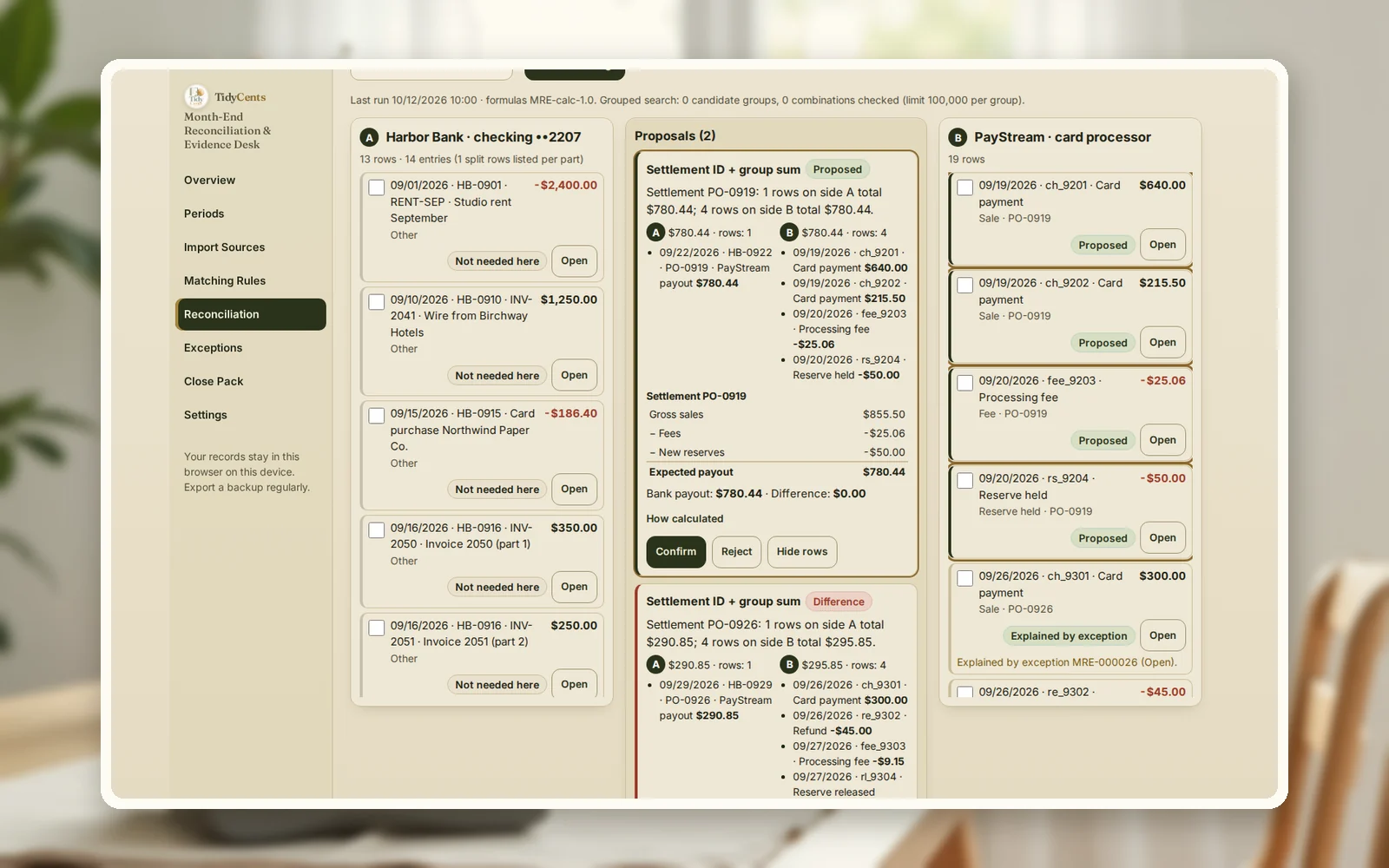
A card-processor payout almost never equals your sales for the day. It equals the sales in one settlement batch, minus refunds, minus processing fees, minus any amount held in reserve, plus any reserve released — paid one or more days later. To reconcile, group the processor's rows by settlement (payout) ID, check that they add up to the bank deposit with the same ID, and write down an explanation for every amount that does not. In the example below, a $386.83 deposit is exactly $430.00 of sales − $30.00 refunded − $13.17 of fees.
Why payouts and deposits do not line up
Most month-end differences between sales, the processor and the bank come from a handful of causes:
- Netting. The processor pays the net amount; your sales report shows gross.
- Timing. Sales on the 30th can be paid out on the 2nd — money in transit at month end.
- Fees on separate lines. Some fees appear per transaction, others monthly, and some only on the bank statement.
- Refunds and disputes. They reduce a later payout, not the day of the original sale.
- Currency. A payment booked in euros but received in dollars will never match on amount.
A good reconciliation does not hide these differences; it explains each one with an owner and a document.
The formula
- Expected payout = Σ sales − Σ refunds − Σ fees − reserves held + reserves released, for one settlement ID.
- Payout difference = bank deposit − expected payout. Zero means matched; anything else is an exception.
- Bank balance check = opening balance + all movements in the period = closing balance on the statement.
- Unexplained amount = differences that are neither matched nor written up as exceptions. It must be zero before you close.
A worked example
The numbers come from the demo of the Month-End Reconciliation & Evidence Desk: a fictional design shop with three sources — its bank account, its card processor and the cash-at-bank account in its books.
Payouts that match. Each payout is rebuilt from the processor rows that carry its settlement ID:
| Payout | Sales | Refunds | Fees | Expected | Bank deposit |
|---|---|---|---|---|---|
| PO-0811 | $720.00 | $0.00 | $21.60 | $698.40 | $698.40 |
| PO-0829 | $900.00 | $60.00 | $25.20 | $814.80 | $814.80 |
| PO-0905 | $430.00 | $30.00 | $13.17 | $386.83 | $386.83 |
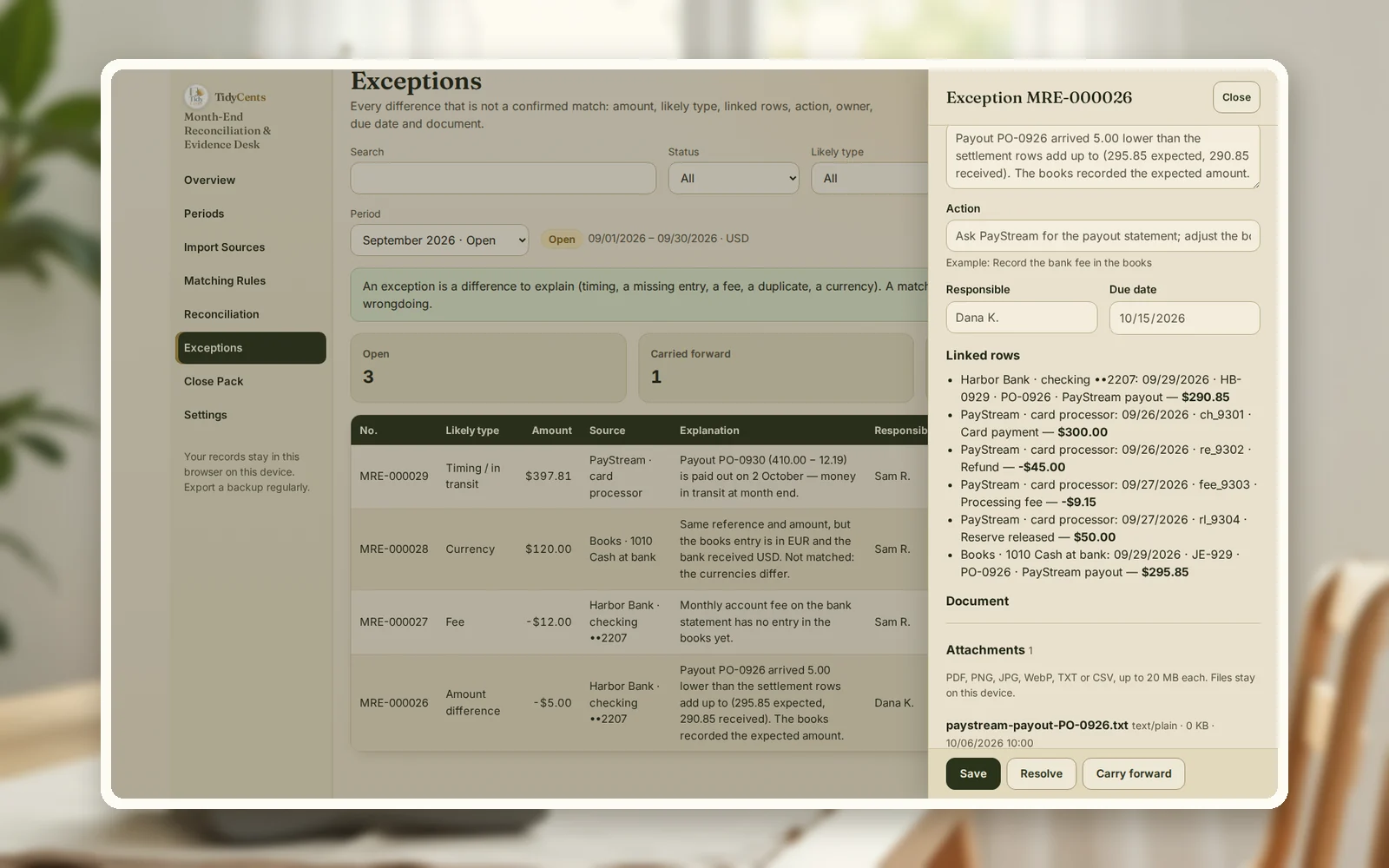
Differences that need an explanation. In September four items do not match, and each becomes an exception with an owner and a due date rather than a silent adjustment:
- PO-0926 arrived $5.00 short — $295.85 expected, $290.85 received. Action: ask the processor for the payout statement.
- A $12 monthly bank fee is on the statement but not in the books yet. Action: record it as a bank charge.
- A $120 receipt booked in EUR but received in USD — same reference and amount, different currency, so it is not matched automatically.
- PO-0930 is in transit: $410.00 of sales less $12.19 of fees, paid out on 2 October. It belongs to September's sales and October's bank statement.
Closing and reopening. August was closed with the statement balance agreeing: $7,900.00 opening, $5,522.95 closing. The bank then issued a corrected statement with a missing $4.50 card-terminal fee. The month was reopened as version 2, the fee matched, and the new closing balance of $5,518.45 agreed again — with the reason for reopening kept in the evidence pack.
Step by step: reconcile payouts and close the month
- Export the bank, the processor and your books for the period, and check the signs (money in positive, money out negative).
- Check the bank balance first: opening + movements = closing. If not, a row is missing.
- Group processor rows by settlement ID and rebuild each payout: sales − refunds − fees − reserves.
- Match each payout to its bank deposit by settlement ID or reference, then by amount and a short date window.
- Leave equal amounts ambiguous when two deposits could match; decide with a reference, not a guess.
- Write up every difference as an exception: amount, explanation, action, owner, due date.
- Close the month with an evidence pack — balances, matches, exceptions, rules used — and reopen it as a new version if a corrected statement arrives.
Common mistakes
- Comparing gross sales with bank deposits. Compare net payouts.
- Matching by amount only. Two equal deposits can match the wrong payout; use the settlement ID.
- Forgetting money in transit. Late-month sales are paid next month.
- Adjusting the books to make it balance. Explain the difference instead; adjust only when you know why.
- Ignoring bank-only fees. Monthly account fees never appear in the processor export.
- Overwriting a closed month. Reopen it as a new version so the history stays.
When a tool helps
A spreadsheet can match one month of one processor. Several sources, settlement batches, partial refunds, fees on different lines and an audit trail are harder. The Month-End Reconciliation & Evidence Desk imports bank, processor and ledger exports, rebuilds each payout, applies visible matching rules in a fixed order, keeps ambiguous matches open until you decide, records exceptions with owners and closes each month with a versioned evidence pack. Exact decimal arithmetic, no AI guesses. If your bank and books are off by one mystery amount, the free bank reconciliation difference finder can point to the likely cause.
Open the demo with the design shop above — every screen, no sign-up — then import your own exports.
Open the Month-End Reconciliation & Evidence DeskAll tax, accounts and invoice tools
Related guides: why a bank reconciliation does not balance, how to balance a cash drawer and how to respond to a chargeback.
FAQ
Why is my payout less than my sales?
Because the processor deducts refunds, fees and sometimes a reserve before paying out, and pays later than the sale date. Rebuild the payout from the rows with the same settlement ID to see exactly what was deducted.
How do I find which sales are in which payout?
Use the settlement or payout ID in the processor export. Every sale, refund and fee row in a payout carries it; grouping by that ID gives you the payout's contents.
What should I do with money in transit at month end?
Record it as a reconciling item: the sales belong to this month, the deposit to the next. Show it in your close pack so the bank balance and the books still agree.
What if two deposits have the same amount?
Do not guess. Leave the match ambiguous and decide using the reference, the settlement ID or the date of the batch. Matching the wrong one hides an error until a later month.
Do I also need to compare the processor with my books?
Yes. Bank against books shows that the cash is recorded; processor against bank shows that every payout is complete. Doing both catches a sale recorded in the books that was never paid out, and a fee taken by the processor that never reached the books.
How often should I reconcile?
At least monthly, before you file anything that relies on the numbers. Businesses with many card payments often reconcile payouts weekly, so differences are found while the processor can still explain them.
This is decision support, not accounting or tax advice.
Tools mentioned in this guide
 Interactive tool
Month-End Reconciliation & Evidence Desk
Match bank, payment and accounting records, explain the differences and build a clear month-end evidence pack.

