
Map business responsibility without losing ownership
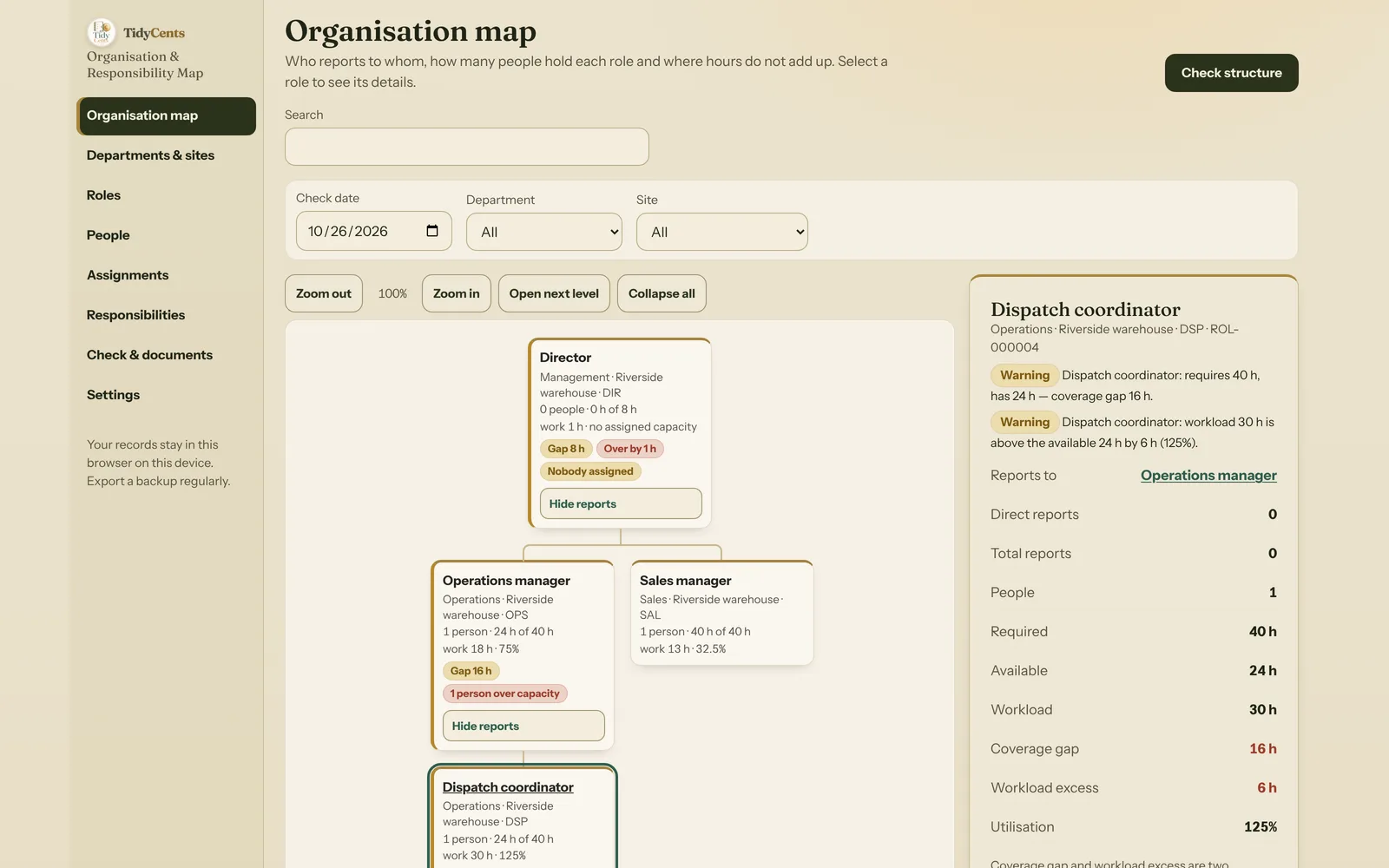
An organisation chart answers who reports to whom. It does not necessarily answer who owns the result of a particular task. A business can have a neat chart and still discover that nobody owns supplier onboarding, a customer handover or a recurring approval. The fix is not a prettier chart: it is to connect three things that usually live in different places — the reporting lines, the people and their hours, and the list of responsibilities and decisions.
This article walks through that connection with a small worked example and the numbers it produces.
Separate people from roles
One person may be both operations manager and dispatch coordinator. If you create two employee records to represent those hats, your headcount and your available time will be overstated. Keep one person and connect that person to both roles through explicit hour assignments.
In the fictional example used below, a small wholesaler has four roles:
- Director at the top of the structure,
- Operations manager and Sales manager, both reporting to the Director,
- Dispatch coordinator, reporting to the Operations manager.
The Director therefore has 2 direct reports and 3 reports in total (Operations, Sales and Dispatch, each counted once). The Operations manager has 1 direct report and 1 in total. These counts describe the structure. They say nothing about how well anyone manages, and they should not be turned into a score.
Two people work there. Maya holds Operations for 24 hours a week and Dispatch for another 24. Leo holds Sales for 40 hours. The headcount is 2, not 3: three role seats are filled, but by two people.
Name one accountable owner for each responsibility
Contributors may help and an approver may make the final decision, but a long list of names should not hide the absence of a clear owner. Each recurring responsibility or decision gets:
- one owner role — the role accountable for the result;
- an approver only where your real process needs one — no approver is not an error;
- contributors, who help but do not add hours;
- estimated hours per week, optionally split between roles.
Take "Customer order handover": 12 hours a week, owned by Operations, with Sales as a contributor. The hours are split Operations 8 + Dispatch 4 = 12. Listing Sales as a contributor does not change the 12 hours. If someone typed 8 + 5, the split would add up to 13 against an estimate of 12 — that is an error to fix, not a rounding difference to ignore.
A decision is the same kind of record with one rule added: it must have an owner. "Approve credit terms above 5,000" is owned by the Director role.
Where a responsibility is genuinely unassigned, keep it on the exception list rather than silently dropping it. In the example, "Supplier onboarding" takes 3 hours a week and has no owner. Those 3 hours stay visible as unassigned hours in every view and every export.
Check the hours behind the structure
A person with 40 available hours who is assigned 24 hours in operations and another 24 in dispatch has:
24 + 24 = 48 hours assigned, 48 − 40 = 8 hours of over-allocation.
Drawing the boxes differently will not remove that conflict. Neither will counting Maya twice, which would make the business look as if it had 80 hours available where it has 40.
Two details matter when you check hours:
- Check a date, not a sum of the past and the future. An assignment that ends on 31 October is still active on 31 October and no longer active on 1 November. A person who moves from one assignment to the next is never counted twice. In the example, Maya covered Dispatch for 16 hours until 1 March and for 24 hours from 2 March; on any single day only one of those counts.
- No person can be assigned more than the 168 hours a week has. That is an input error, not a busy week.
Distinguish role coverage from documented workload
This is the step that is most often confused. Suppose Dispatch requires 40 hours, has 24 assigned hours and carries 30 hours of recorded responsibilities (4 hours of the handover plus 18 hours of route planning and 8 hours of the daily dispatch board).
- Coverage gap = max(0, required − available) = max(0, 40 − 24) = 16 hours.
- Workload excess = max(0, workload − available) = max(0, 30 − 24) = 6 hours.
- Utilisation = workload ÷ available = 30 ÷ 24 = 125%.
These are two views of the same role. They should not be added together as a 22-hour staffing need. The coverage gap says the role is set up for more hours than anyone gives it. The workload excess says the work you have written down already does not fit the hours people give it. A role can have a coverage gap with light workload — for example 40 hours required, 20 assigned and 10 hours of work: gap 20 hours, no excess, utilisation 50%. That role is not "fully covered" just because its current work is small.
Utilisation is not capped at 100%: 150% is a real signal. And when a role has work but no hours at all, there is no percentage to show — the honest result is "no assigned capacity", not infinity and not 0%.
Look for structural errors before publishing
Some problems are errors, not warnings, because any document built on them would be wrong:
- A reporting cycle: following the management line eventually returns to the same role. If someone set the Director to report to Dispatch, the chain Director → Dispatch → Operations → Director would never end. Until it is fixed, no "ready" chart or register should be produced.
- A role that reports to itself or to a role that does not exist.
- References to deleted records: an assignment to a role that is gone, a responsibility whose owner was removed.
- Negative hours, an end date before the start date, or a decision without an owner.
Several separate tops are fine. An internal auditor who reports outside the management line can be a second root; nobody needs to invent a "CEO" box to make the chart tidy.
Warnings are different: a responsibility without an owner, an owner role nobody holds on the date, a person over their available hours, workload above available hours, a coverage gap and an empty role. They stay visible on the documents.
When the organisation is larger
A medium-sized business needs filters and consistent identifiers as much as a clear drawing. Departments and sites should help you inspect the structure without turning a shared employee into several different people.
The second fictional demo is a distributor with 120 people, 6 departments, 3 sites and 140 roles. Eight positions are vacant, which shows up as 320 hours of coverage gap (8 roles × 40 hours), not as "missing names". One responsibility — a supplier due-diligence file that accounts payable and quality both touch — has no owner, and one person holds two roles for 24 + 24 = 48 hours against 40 available.
Two rules keep filtered views honest:
- When you filter by a department, a role whose manager sits outside the filter still shows that link — as an outside box with the role title and department only, without the other department's personal data.
- A filter never hides responsibilities without an owner. They appear in every filtered register, because "nobody owns it" is exactly the kind of finding a department head needs to see.
A short checklist
- One record per person; roles connected by hour assignments.
- One owner role per responsibility; approvers only where needed; contributors add no hours.
- Splits that add up exactly to the estimate.
- Hours checked on a specific date, never summed across past and future.
- Coverage gap and workload excess shown side by side, never added.
- No cycles, no self-managers, no references to deleted records before you share the chart.
Organisation & Responsibility Map connects reporting lines with responsibility records and hour checks, and it calculates every figure above from the records you enter — no AI guesses. Open the fixed demo to inspect the small company's conflicts and the larger departmental structure. Use SOP & Work Instruction Studio to explain how a task is performed; use this map to make its ownership explicit. If the question is whether to hire for a gap, Hiring Cost, Ramp-Up & Capacity Lab puts the cost and ramp-up on a timeline.
Tools mentioned in this guide
 Interactive tool
Organisation & Responsibility Map
Make reporting lines and business ownership visible. Find responsibilities without an owner and assignments that exceed the hours your team has available.

