
How many jobs fit in a day? Count travel honestly
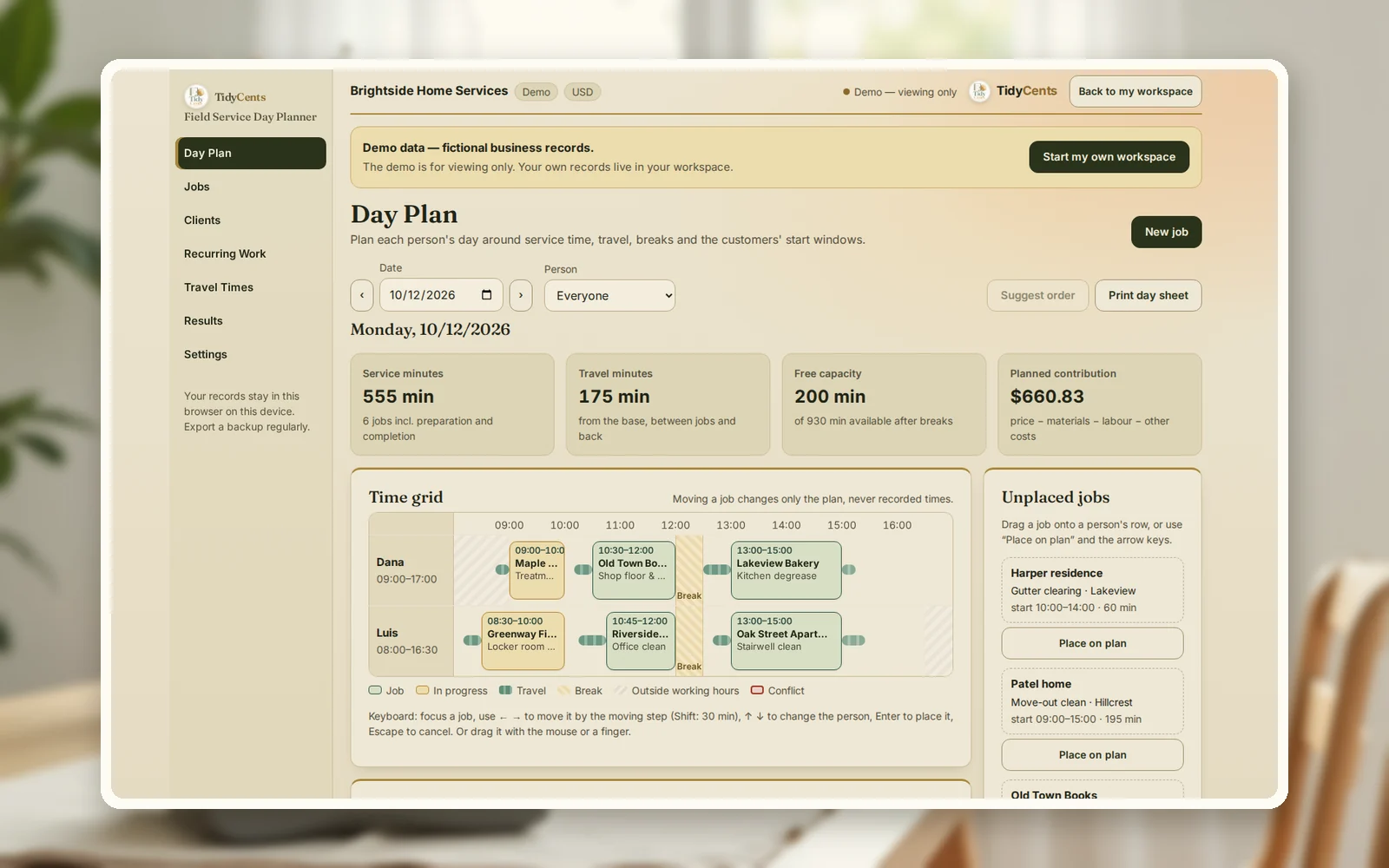
The number of jobs that fit in a day is the minutes you can actually work (shift minus breaks) divided by what each job really takes — preparation, the work itself, wrap-up and the drive to get there, plus the drive back. Plan from that, not from a list of appointment times. In the example below, three cleaning jobs use 350 of 450 working minutes; 80 minutes of that is driving. On another day, a plan that looks fine on paper asks a cleaner to arrive 25 minutes before he can physically get there.
Why appointment lists overbook
A list of start times hides three things:
- Travel. Thirty minutes between two jobs is thirty minutes nobody pays for unless you price it in.
- Fixed windows. "Between 10:00 and 10:30" means a late arrival is a failed visit, not a short delay.
- Breaks and shift ends. A job that runs into lunch or past the end of the shift is either overtime or a rushed job.
The result is the familiar day: the first job starts on time, the second is late, the third is cut short — and the profit of the day is smaller than it looked.
The formula
- Available minutes = shift length − breaks.
- Occupied minutes per job = preparation + service + completion.
- Used minutes = Σ occupied minutes + Σ travel (base → first job, between jobs, last job → base).
- Free minutes = available − used. Negative means the day is overbooked.
- Earliest arrival = end of previous job + travel time. If the planned start is earlier, the plan is impossible.
- Job contribution = price − materials − labour for its minutes (including the travel allocated to it) − other costs.
A worked example
The numbers are the demo of the Field Service Day Planner: a fictional cleaning company with two cleaners and a travel table between town zones.
A day that works. Dana works 09:00–17:00 with a 30-minute break: 450 available minutes. Three jobs:
| Job | Zone | Window | Planned | Time on site | Travel in | Contribution |
|---|---|---|---|---|---|---|
| Treatment room deep clean | Riverside | 08:45–09:30 | 09:00–10:00 | 60 min | 15 min | $92.50 |
| Shop floor & window clean | Old Town | 10:00–11:00 | 10:30–12:00 | 90 min | 20 min | $89.00 |
| Kitchen degrease | Lakeview | 12:30–13:30 | 13:00–15:00 | 120 min | 30 min (+15 back) | $148.00 |
Service takes 270 minutes, travel 80, so 100 minutes are free and the day contributes $329.50. One warning remains: to start at 09:00 in Riverside, Dana must leave the base at 08:45 — before her shift begins. Either the start moves or the shift does.
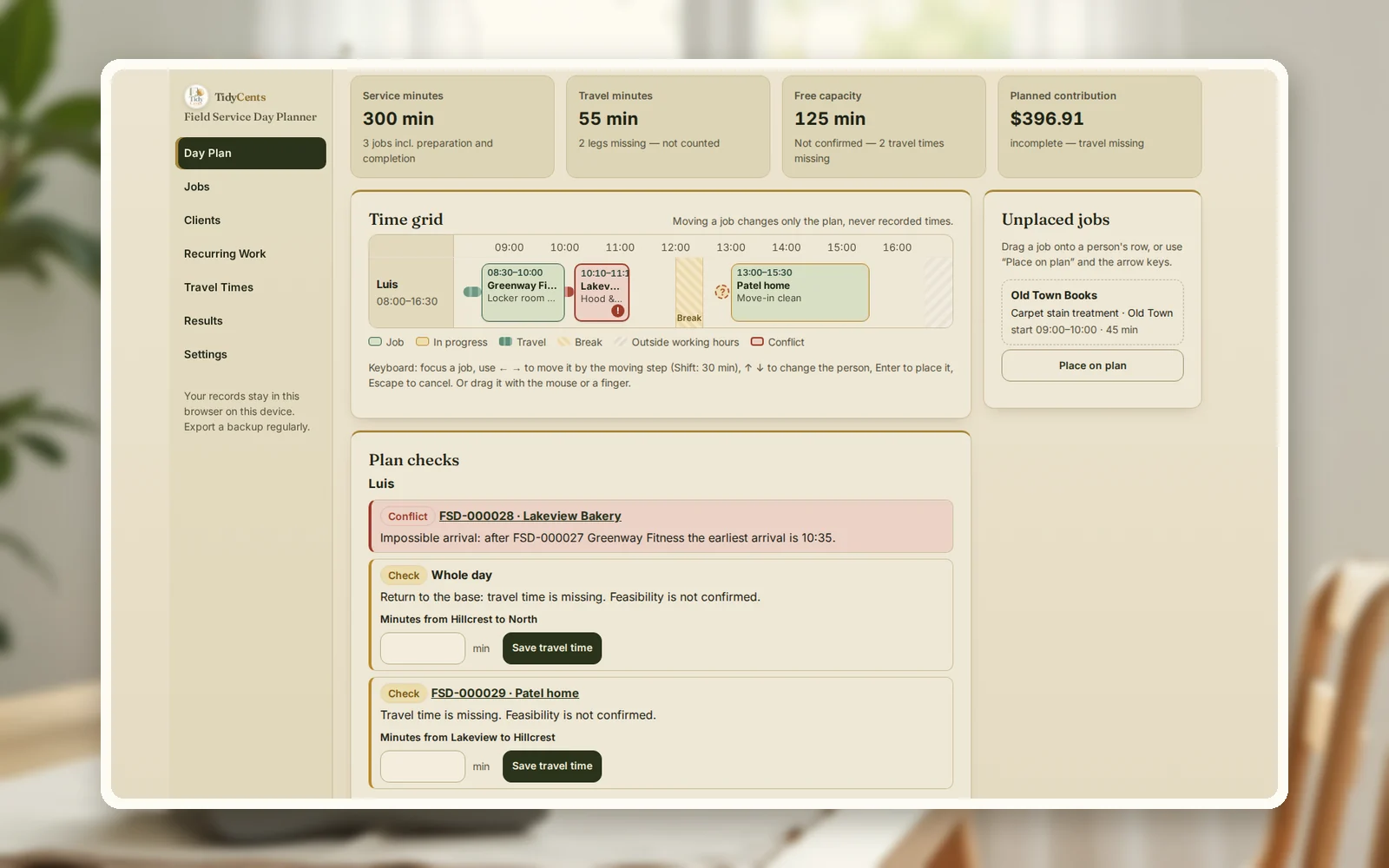
A day that does not. Luis's plan for 13 October looks reasonable as a list:
- Locker room deep clean in East Park, 08:30–10:00.
- Hood and extractor clean in Lakeview, planned at 10:10, window 10:00–10:30.
- Move-in clean in Hillcrest at 13:00.
But the drive from East Park to Lakeview takes 35 minutes, so the earliest arrival is 10:35 — after the client's window closes. The planner flags it as a conflict before the day starts, while there is still time to call the client or swap the order. It also notes that no travel time is entered between Lakeview and Hillcrest, so the 125 "free" minutes are not confirmed.
Step by step: plan a realistic day
- Write down each person's shift and breaks, and turn them into available minutes.
- Give every job three times: preparation, service and wrap-up. Use your actual averages.
- Build a travel table between the zones you work in, and check it now and then.
- Respect windows: earliest and latest start agreed with the client.
- Lay the jobs out in order and compute the earliest arrival for each one.
- Fix conflicts before the day: move a job, swap the order or call the client.
- Record actual times and materials after the job, and compare planned with actual contribution.
Common mistakes
- Planning start times without travel. The second job is late before the day begins.
- Forgetting the return trip. The last job's drive home is still working time.
- Using one average job length. A deep clean and a weekly clean are different jobs.
- Ignoring windows. Arriving outside a window can mean no access at all.
- Counting unknown travel as zero. Missing travel times make free time look bigger than it is.
- Pricing without travel. A job in a far zone needs a higher price or a better route.
When a tool helps
A paper diary works for one person and a handful of jobs. With two or more people, recurring visits, windows, access notes and materials, the gaps appear. The Field Service Day Planner lays out each person's day with travel and breaks, flags impossible arrivals and missing travel times, keeps access notes and checklists on the job card, creates recurring visits without duplicates and compares planned with actual contribution. Exact decimal arithmetic, no AI guesses. For a quick price check on outdoor work, the free lawn care pricing calculator is a start.
Open the demo with the cleaning company above — every screen, no sign-up — then add your own people and jobs.
Open the Field Service Day PlannerAll sales and daily operations tools
Related guides: how to follow up on a quote, salon profit per service hour and how to check timesheets before payroll.
FAQ
How many cleaning jobs can one person do in a day?
It depends on job length and travel, not on a standard number. With a 450-minute day, three jobs of 60, 90 and 120 minutes plus 80 minutes of driving leave 100 minutes free — room for one short nearby job, not a fourth long one.
How much travel time should I plan between jobs?
Use the real driving time between the zones at that time of day, measured once and checked occasionally. A table of zone-to-zone minutes is more accurate than one average for the whole town.
Should travel time be paid?
That depends on your employment rules and agreements; check what applies to you. For pricing, count it either way: the minutes are spent, so they belong in the job's cost.
What is a service window?
The earliest and latest start the client accepts. A plan that arrives inside the window is feasible; one that arrives after it fails even if the job itself is short.
How do I put travel into a job's price?
Give each drive to the job it leads to, and the drive home to the last job of the day. In the example, the kitchen degrease carries 30 minutes in and 15 minutes back, so its labour covers 165 minutes, not 120 — and its contribution is calculated on that.
Can it plan the route for me?
It can suggest an order for one person's day based on windows and your travel table. It is a suggested order, not a proven optimal route, and it says so.
This is decision support, not legal, payroll or employment advice.


