How to get back on budget after missing weeks — without back-filling
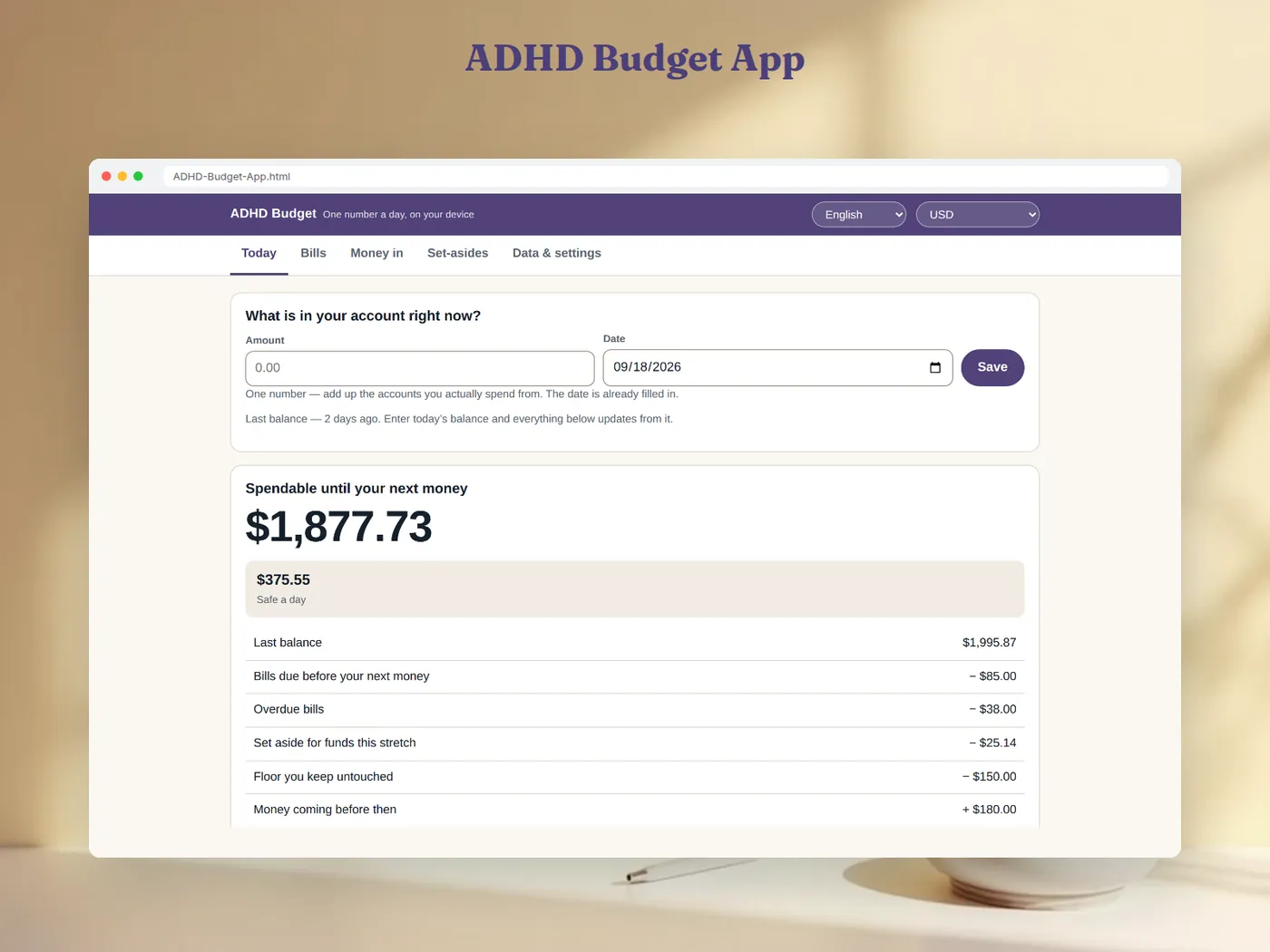
To get back on budget after missing weeks, do not back-fill a single transaction. Type today's account balance, subtract the bills due before your next money, anything overdue, this period's share of your savings pots and the floor you keep, then add money you are sure is coming. The result is what you can spend until the next money — correct today, whatever happened in the gap. In the example below, someone who stopped for three weeks is current again with one number: 1,877.73 free until payday in 5 days, 375.55 a day.
The gap itself becomes one fact, not homework: over those 21 days, 1,904.13 went out.
Why "catching up" is where budgets die
A transaction-based budget is only right if every purchase is in it. Miss three weeks and there is a backlog: if you usually make three card payments a day, that is about 63 entries to find, type and categorise before the totals mean anything again. That backlog is the point where most budgets are quietly abandoned — not because the arithmetic is hard, but because the restart now costs an evening.
There is a second trap: a streak or a "days logged" counter. Once it reads zero, opening the budget means being shown what you did not do.
The fix is structural rather than motivational. Work out your position from your balance, which is correct whether or not you wrote anything down, and treat spending as something derived:
What went out = earlier balance + money that came in − today's balance.
With that rule, a gap of a day and a gap of a month cost the same: one number.
A worked example: back after 21 days
The last balance entered was 2,400.00, three weeks ago. Since then a paycheck of 1,500.00 arrived. Today the banking app shows 1,995.87.
Step 1 — describe the gap, once. 2,400.00 + 1,500.00 − 1,995.87 = 1,904.13 went out over 21 days. That is a statement about a period. Nothing asks you to split it into days or categories.
Step 2 — look forward only. Your next money is 5 days away.
| Line | Amount |
|---|---|
| Balance today | 1,995.87 |
| − Bills due before your next money | −85.00 |
| − Overdue bills | −38.00 |
| − Set aside for funds this period | −25.14 |
| − Floor you keep untouched | −150.00 |
| + Money coming before then | +180.00 |
| = Spendable until your next money | 1,877.73 |
By hand: 1,995.87 − 85.00 = 1,910.87; − 38.00 = 1,872.87; − 25.14 = 1,847.73; − 150.00 = 1,697.73; + 180.00 = 1,877.73.
Step 3 — make it usable at the till. 1,877.73 ÷ 5 days = 375.55 a day.
The overdue line is the honest part of coming back. The water bill of 38.00 fell due during the gap; instead of hiding it, the budget subtracts it now, so the money that looks free really is.
What about bills and savings during the gap?
- Bills: if each bill is stored as an amount, a rhythm and one anchor date, nothing needs updating after a gap — the next due date is worked out from the anchor. A bill that came round while you were away shows as overdue until you mark it paid.
- Irregular bills: turn them into a monthly figure so you can see their weight. Car insurance of 214.00 every 3 months is 214.00 ÷ 3 = 71.33 a month on average.
- Savings pots: fund them for the days this period actually covers. A period you missed is stated once as a shortfall; it is not charged again on top of the current period, so coming back does not trigger a giant catch-up transfer.
How to do it in the ADHD Budget App
The ADHD Budget App is built on exactly this rule. It is one .html file you open in any browser — no install, no account, no subscription and no bank login.
- Bills: for each bill, an amount, a rhythm (every N days, weeks, months or years, or once) and one anchor date. It shows days-until, overdue state and the monthly equivalent.
- Money in: the dated amounts you expect, each marking whether it starts a new period. This gives "next money in N days".
- Set-asides: a target, a date and what you have moved so far.
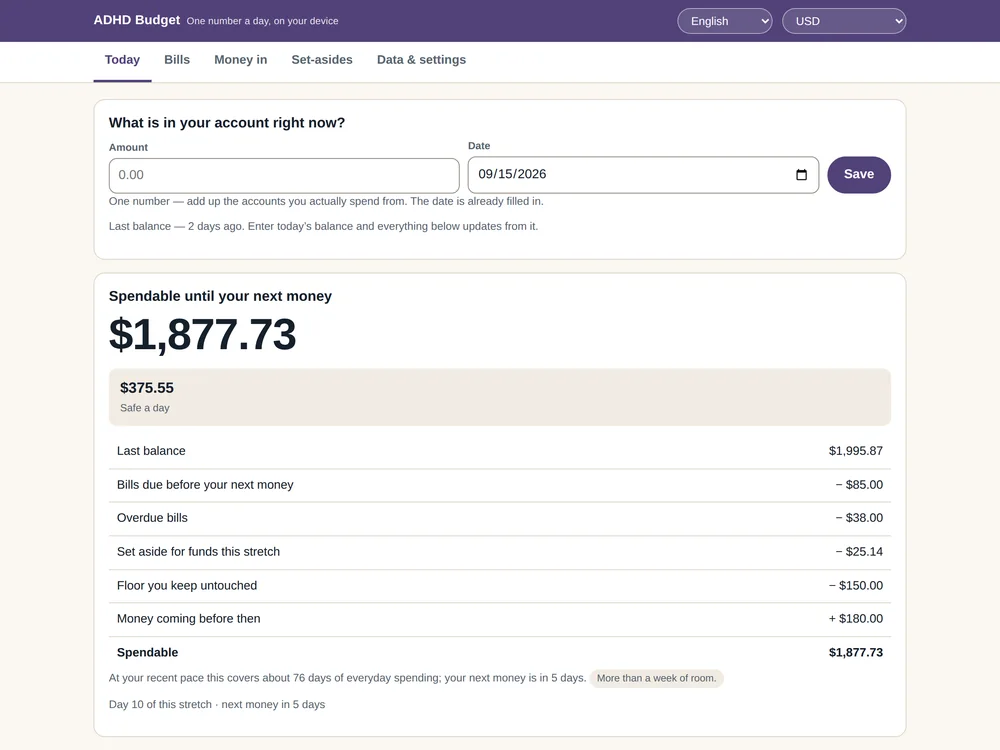
- Today: one field for the balance, with today's date already filled in. Everything above is rebuilt from it, line by line, and the age of your last balance is shown as a plain fact.
There is no streak, no completion meter and no count of days logged anywhere in the file. Your figures stay in your own browser, with backup to a file and CSV export. The arithmetic is checked against a second, independently written model — 616 scenarios, 5,536 comparisons, 0 differences — and there are no AI guesses anywhere in it.
One file, one number a day, and nothing to back-fill when life gets in the way.
Related guides: budgeting by paycheck and budgeting apps after Mint.
FAQ
Do I really never need to enter past transactions?
Not to get a correct number for today. The balance already contains everything that happened. If you want to know where money went in detail, a transaction ledger is the right tool — but it should not stand between you and a usable budget.
What if money came in during the gap that I did not plan?
Add it to money in with its date. It changes the description of the gap ("this much went out") but not today's spendable figure, which starts from the balance you just typed.
Which balance should I type if I have several accounts?
The total of the accounts you actually spend from. Leave out long-term savings you never touch day to day.
Is this only for people with ADHD?
No — it suits anyone who keeps restarting budgets. The ADHD Budget App is a self-help organising tool, not a medical product: it does not diagnose or treat anything and does not replace a professional. It is not financial advice either; it shows arithmetic on numbers you enter.
What happens if I stop again next month?
The same thing: open the file, type the balance, and you are current. The gap is shown as one fact, and nothing counts the days you were away.