
Retainage billing: how progress payments and retention work
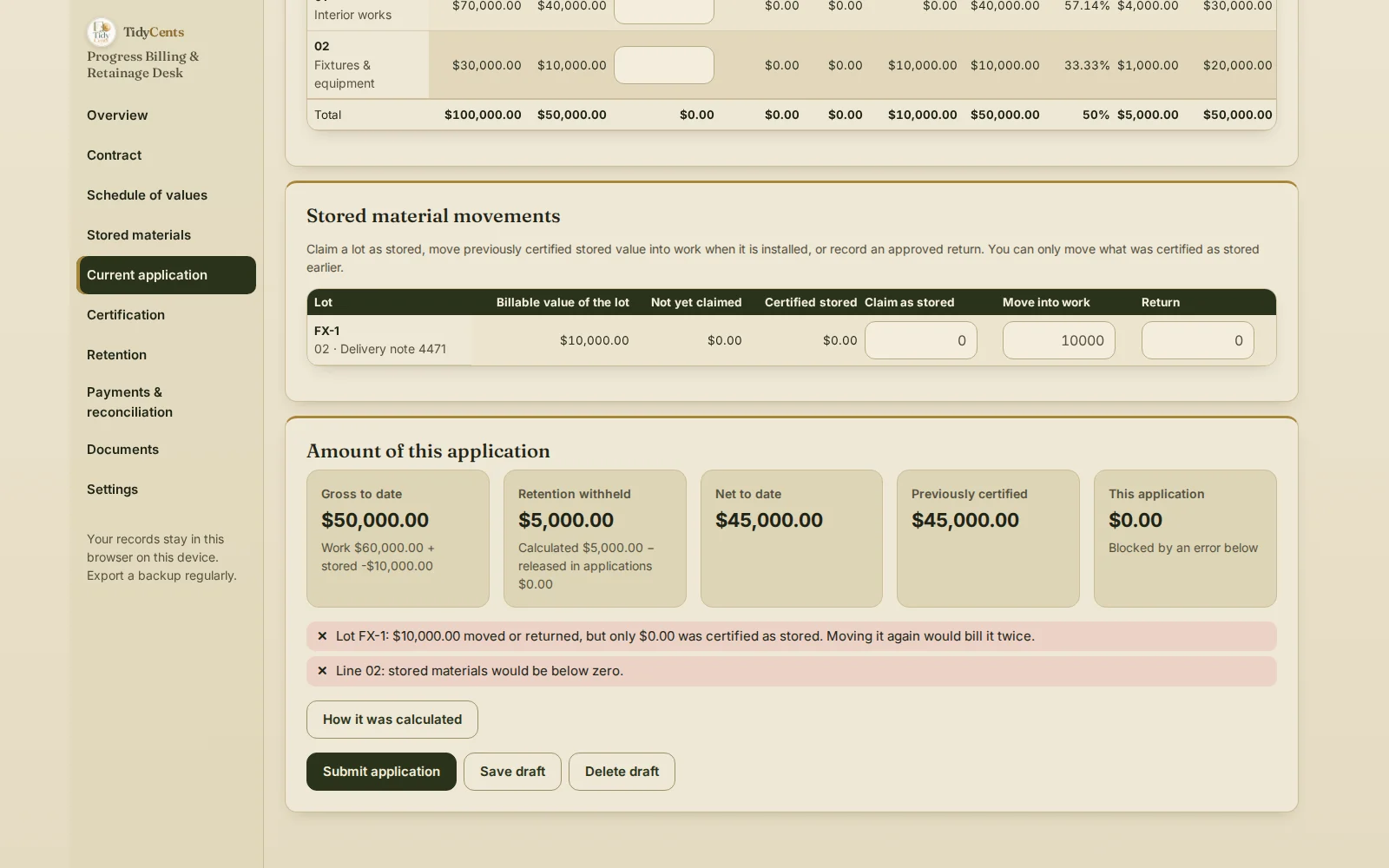
In retainage billing, each progress application totals the work completed to date plus stored materials, holds back the agreed retention percentage, deducts any advance being recovered, and then bills only the difference from the net amount already approved. Retention is not lost money: it is billed later, when the release conditions in the contract are met. In the example below, a $100,000 contract with 10% retention bills $20,000, then $25,000, then $0 when stored materials are installed — while $5,000 of retention waits for release.
Why progress billing goes wrong
A payment schedule says what you hope to bill. Progress billing has to follow what was actually done and approved:
- Every application builds on the last approved one, not on what you requested.
- Stored materials can be billed twice — once as stored and again when installed.
- Change orders count only when approved. A pending change cannot raise the contract value.
- Advances are recovered in steps. Deducting the whole advance from one invoice understates what the client owes.
- Retention has its own life: withheld, released, invoiced, paid — five totals, not one.
The formula
- Gross to date = work completed to date + stored materials not yet installed.
- Retention to date = gross × the retention rate (separate rates for work and materials if the contract says so) − retention released.
- Net to date = gross to date − retention to date − advance recovered to date.
- This application = net to date − net approved in previous applications.
- Balance to finish = current contract value − work and stored materials to date.
A worked example
A simple contract of $100,000 with two schedule-of-values lines, $70,000 and $30,000, and 10% retention on both work and stored materials.
| Application | Work to date | Stored | Gross | Retention | Net to date | This application |
|---|---|---|---|---|---|---|
| #1 | $22,222.22 | $0 | $22,222.22 | $2,222.22 | $20,000 | $20,000 |
| #2 | $40,000 | $10,000 | $50,000 | $5,000 | $45,000 | $25,000 |
| #3 | $50,000 | $0 | $50,000 | $5,000 | $45,000 | $0 |
In application #2, $10,000 of materials sit on site and are billed as stored. In application #3 they are installed: their value moves from stored materials into work, so the gross, the retention and the net to date do not change, and there is nothing new to bill. Moving the same $10,000 a second time is refused, because it would bill the materials twice.
With an advance. On another contract the client paid a $20,000 advance. Work to date reaches $40,000, retention is $4,000 and this application recovers $4,000 of the advance. The progress invoice is $32,000, and the client owes $32,000 on it — not $12,000, because the advance was a separate invoice that was already paid and is not deducted a second time.
A retention release. When the contract allows $2,000 of retention to be released, net to date rises from $32,000 to $34,000 and the next application bills $2,000. The percentage of work complete stays at 50%: a release is money, not progress.
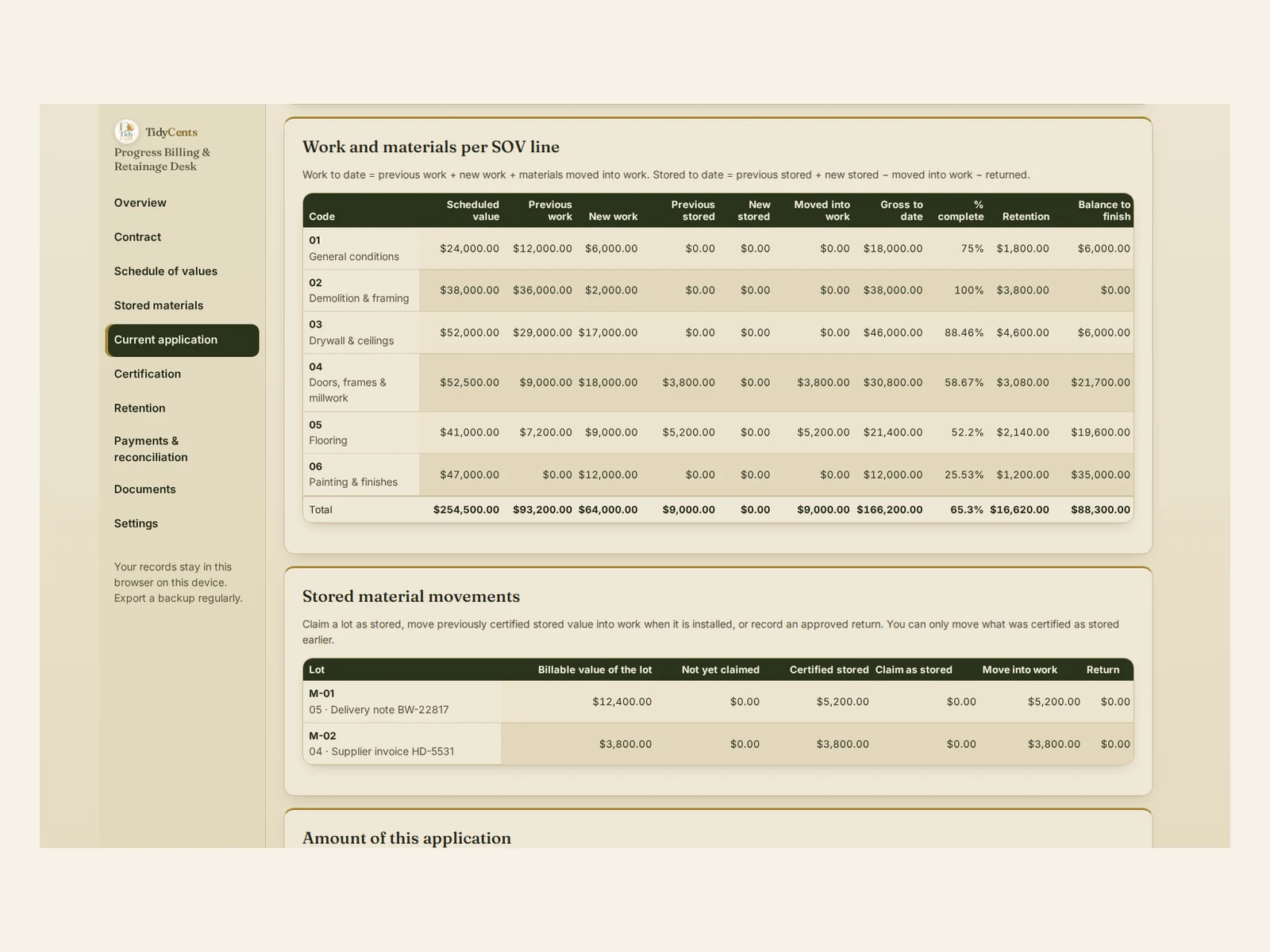
What the demo shows. In the demo of Progress Billing & Retainage Desk, an interior fit-out has a contract value of $254,500 ($248,000 plus $6,500 of approved changes). After application #3, $166,200 gross is approved to date, 65.3% of the contract, and $149,580 net. Retention outstanding is $12,820: $16,620 withheld minus $3,800 released. The balance to finish is $88,300, the receivable is $84,820 with $23,420 overdue, and $5,000 received is not yet allocated to an invoice.
Step by step: bill a progress application with retainage
- Enter the contract terms: value, retention rates on work and materials, any cap, release conditions, advance and payment term.
- Build the schedule of values so its lines add up exactly to the contract value.
- Add change orders and count them only once approved.
- Enter new work per line for the period, and claim stored materials as separate lots.
- Move installed materials into work without changing the gross.
- Record what was approved, with every reduction and its reason; the approved figures become the base of the next application.
- Issue the invoice for this application only, and record receipts invoice by invoice.
- Track retention from withheld to released, invoiced and paid, and bill the release when the conditions are met.
Common mistakes
- Billing from the requested amount instead of the approved one. The next application then starts from the wrong base.
- Billing stored materials again when installed. The value should move, not repeat.
- Counting a pending change order. Until it is approved, it is not part of the contract value.
- Deducting the advance twice. Once through recovery is enough.
- Treating retention as earned income. It is receivable only when the release conditions are met.
- Measuring the receivable as "this application minus all receipts". Follow each invoice and each payment.
When a tool helps
A spreadsheet can total a schedule of values. It rarely keeps every approved application fixed, moves stored lots into work without billing them twice, recovers an advance at the agreed rate, and follows retention through five separate totals and the receivable invoice by invoice. Progress Billing & Retainage Desk does, and every application opens "How it was calculated". It prepares its own payment-application documents from your contract terms; it does not supply licensed standard contract forms or decide lien or prompt-payment rights. Exact decimal arithmetic, no AI guesses. To price the job before you bid, see Contractor Bid & Job Control.
Open the demo with the fit-out above — every screen, no sign-up — then enter your own contract and schedule of values.
Related guides: how to price a contractor job, the cost to recover a delayed project and how to collect overdue invoices.
FAQ
How do you calculate retainage on a progress payment?
Multiply the gross to date — work completed plus stored materials — by the retention rate, then subtract any retention already released. On $50,000 gross at 10%, retention to date is $5,000.
How much do I bill on each application?
Net to date minus the net already approved. In the example, $45,000 net to date minus $20,000 approved earlier gives $25,000.
How are stored materials billed?
Once, as stored, when the contract allows it. When they are installed their value moves into completed work, so the gross does not change and nothing extra is billed.
When is retainage paid?
When the release conditions in your contract are met — for example a stage of completion. The release is billed as a separate amount; it raises what you can bill without changing the work percentage.
This is decision support, not legal advice: retention, lien and payment rights depend on your contract and local law.
Tools mentioned in this guide
 Interactive tool
Progress Billing & Retainage Desk
Keep progress claims, stored materials, approvals and retainage connected from the first application to final payment.

